
Calendars
Connect a Google or Microsoft calendar so a voice agent can book, look up, cancel or move appointments during a call.
Connect a Google or Microsoft calendar and your voice agent can book appointments straight into it during a call. It checks which times are free, offers them to the caller, and creates the booking without anyone on your team picking up the phone. If you allow it, callers can also look up, cancel or move an appointment they already have.
Calendars and knowledge do different jobs Knowledge gives an agent facts to answer with. A calendar gives it something to do: read a live schedule and change it. A receptionist agent often uses both.
Calendar connections belong to your whole account, not to one agent. Any agent can book into a connected calendar, and service flags can import holiday dates from one. That is why they live in Settings.
Where to find calendars
In Voice agents, click Calendars in the panel on the left. It is marked in Settings with a small arrow, because it opens a different part of the portal.
You land on Settings, on the General page, with the Calendars section already selected in the list of sections. A Back to Voice agents link sits at the top right of the page header and takes you back to your list of agents. The link also appears if you arrive from the Calendars link that a booking row shows when no calendar is connected yet.
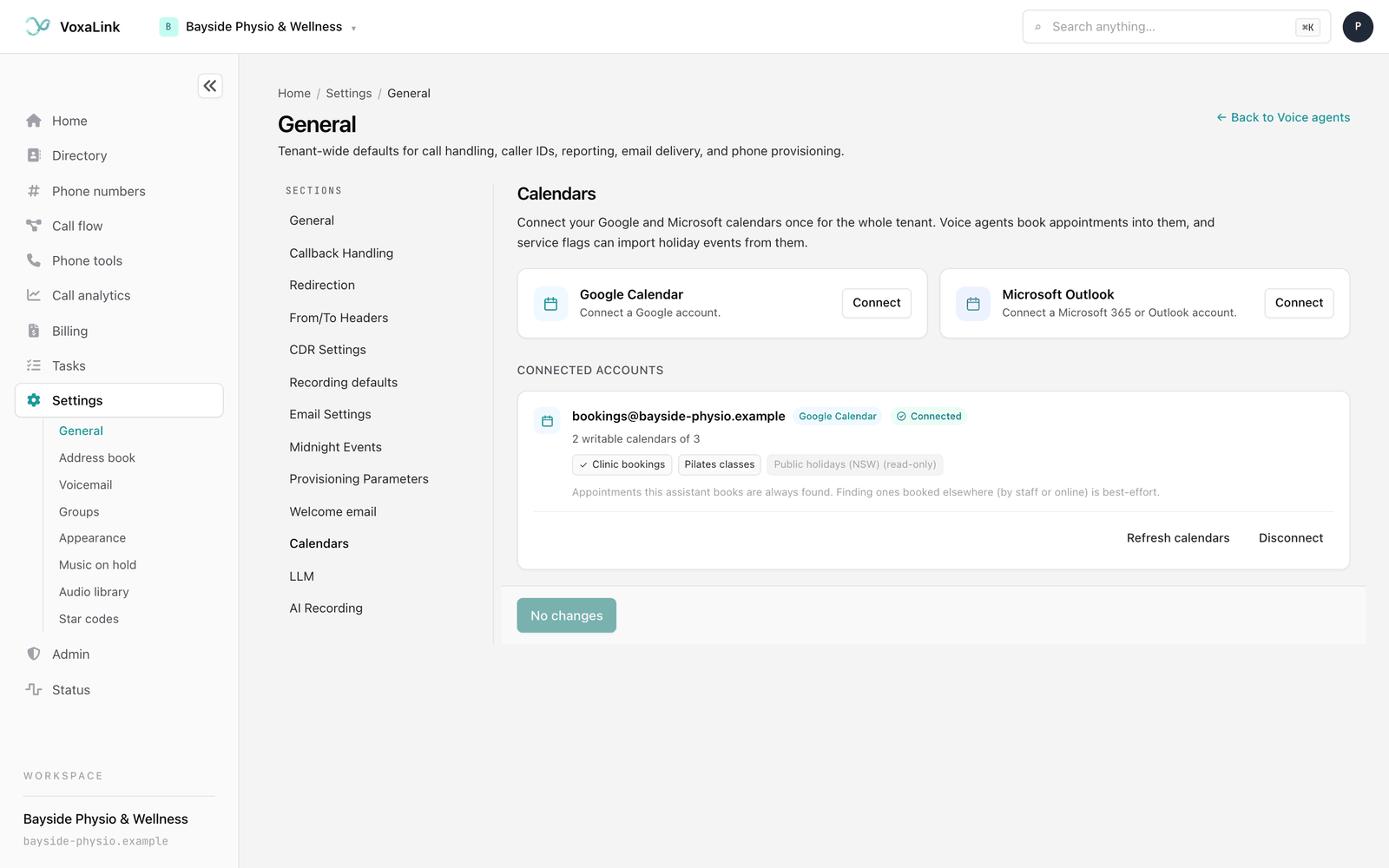
After you connect an account, the sign-in sends you back to this page without the Back to Voice agents link, so the link is gone once you've connected. Use Voice agents in the main menu to return.
Connect a calendar
- On the Calendars section, find the Google Calendar or Microsoft Outlook card and click Connect.
- Sign in to that account and allow VoxaLink access when asked.
- You return to the Calendars section with a message such as "Google Calendar connected. Voice agents can now book into it, and service flags can import its holidays."
The account now appears under Connected accounts, showing its email address, a Connected badge, and each calendar in it. A calendar marked (read-only) can't take new bookings, so agents only offer the calendars you can write to. The line under the email says how many of the account's calendars are bookable, for example "2 writable calendars of 3".
If a card says Not set up on the server yet, that calendar type isn't available on your account. Ask your provider.
Keep a connection healthy
- Refresh calendars fetches the account's calendar list again. Use it after you add or share a new calendar in Google or Outlook.
- Reconnect needed appears when the account withdrew access or the sign-in expired. Click Reconnect and sign in again to keep bookings working.
- Disconnect removes the account. You are asked to confirm first.
Let an agent book appointments
Booking is set on a playbook row whose action is Appointment. Without a calendar, that row collects the caller's request as a task for your team. With a calendar, it books a real appointment. For how playbook rows work, see Playbook and transfers.
- Open the agent and, in the Call view, open the playbook row for booking. For example, a row called "Book an appointment".
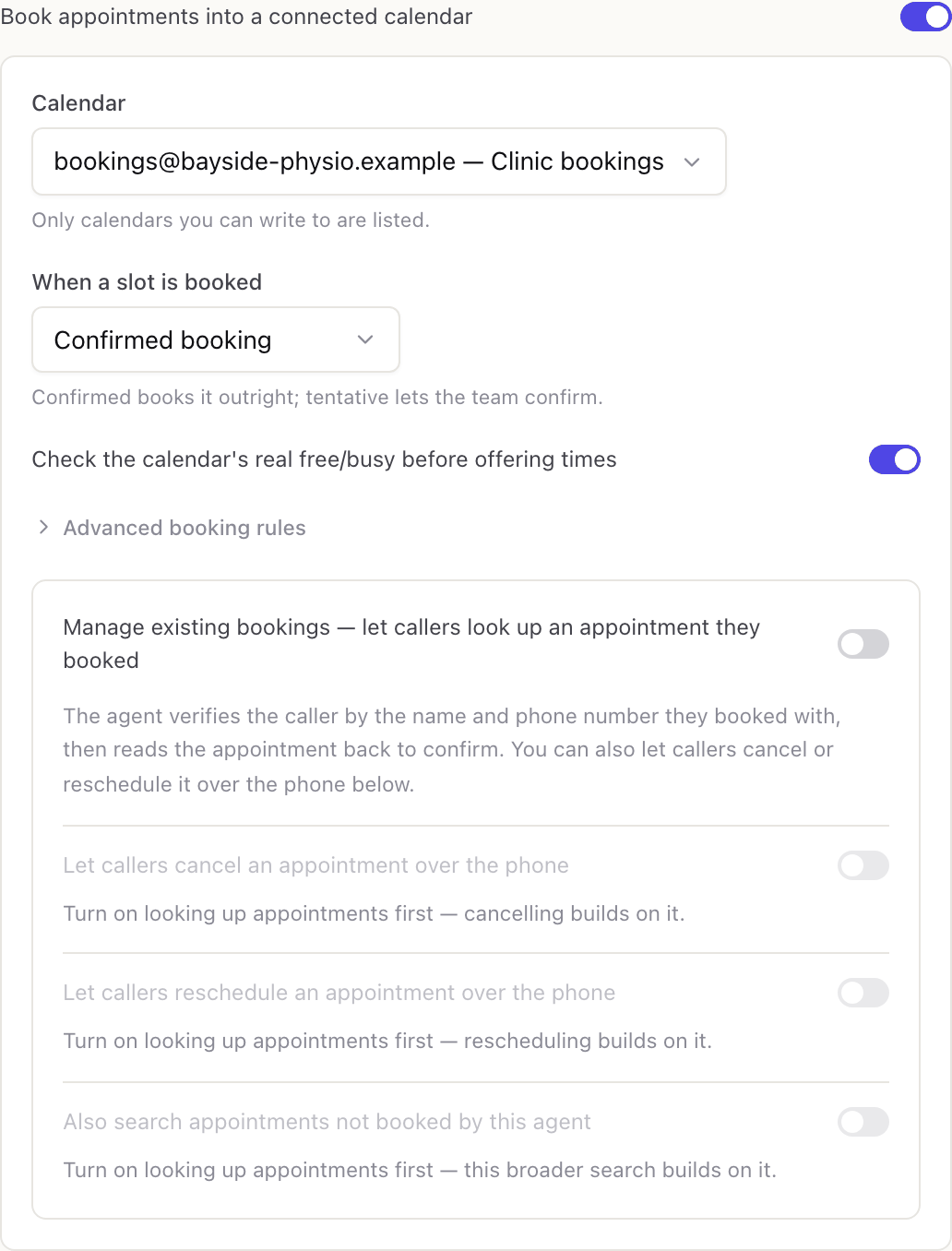
- Turn on Book appointments into a connected calendar. If no calendar is connected yet, the switch is greyed out and a link takes you to the Calendars section.
- In Calendar, choose where bookings go. Each option shows the account and the calendar name. If only one calendar is available, it is picked for you.
- In When a slot is booked, choose Confirmed booking to book it outright, or Tentative, business confirms if your team wants to confirm each one before it counts.
- Leave Check the calendar's real free/busy before offering times on, so the agent only offers times that are actually free.
- Save the draft, then Publish or Update live when you are ready. See Testing and publishing.
Give each booking row a clear name in When the caller wants to…, because the agent uses it to know which calendar to book. You can have several booking rows that each book into a different calendar, for example one for physiotherapy and one for remedial massage.
Advanced booking rules
Click Advanced booking rules to set when appointments can be offered. These start with sensible values:
- Slot length (min): how long each appointment is. Starts at 30.
- Buffer (min): a gap left after each appointment. Starts at 0.
- Min notice (hrs): how soon an appointment can start. Starts at 2, so a caller at 10 am can't book 11 am.
- Book up to (days): how far ahead callers can book. Starts at 30.
- Timezone: the time zone for the bookable hours. Starts at Australia/Sydney. This is separate from the Time zone on your business hours, which starts as Australia/Melbourne, so check both if you use both.
- Bookable hours: the weekly windows the agent may offer, Monday to Friday 9 am to 5 pm to start. Click + Add window to add one, or the bin icon to remove one. Add two windows on the same day to leave a lunch break free.
The portal doesn't check that these rules make sense together, so read them back once you've set them.
Bookable hours are about when you take appointments. When the agent answers the phone is a separate setting, covered in Business hours and escalations.
Let callers manage an existing booking
On the same row you can let callers deal with an appointment they already have.
- In the row's Collect from the caller list, make sure there is a phone number field marked as required. The agent checks who is calling by the name and number the booking was made with, so this field must be there before the next switch can be turned on.
- Turn on Manage existing bookings, which lets callers look up an appointment they booked. The agent confirms the caller's name and number, then reads the appointment back.
- Optionally turn on Let callers cancel an appointment over the phone. Set Cancellation notice (hours) if late cancellations should go to your team instead. With a notice of 24, a cancellation within 24 hours of the appointment becomes a staff task. Leave it at 0 to let callers cancel any upcoming appointment themselves.
- Optionally turn on Let callers reschedule an appointment over the phone, with a Reschedule notice (hours) that works the same way. The agent offers free times and moves the booking to the new slot.
- Optionally turn on Also search appointments not booked by this agent to find bookings your staff entered or a caller made online.
Every cancellation or reschedule is also logged as a task for your team. Tentative holds and appointments that have already started are always handed to a person.
Appointments booked elsewhere are matched less precisely. The agent only reads one back when the caller's name and the exact number they give both appear on the booking, and those appointments can only be cancelled or moved by a person. The connected account card notes that finding these is best-effort, and less reliable with Microsoft Outlook, whose search is limited.
How double booking is avoided
When Check the calendar's real free/busy before offering times is on, the agent offers only free times. Just before it creates the booking, it checks again that the slot is still free. If someone took it in the meantime, the booking isn't made twice.
If publishing is blocked
An agent that books appointments can't be published while its calendar isn't usable. The message tells you which problem it found:
- No calendar is selected on a booking row. Choose one in the editor.
- The calendar connection no longer exists. Connect the calendar again and choose it in the editor.
- The calendar needs to be reconnected. Click Reconnect in the Calendars section.
- The calendar is no longer writable. Pick a different calendar in the editor.
- You have more than one booking row, and a row has no clear name or two rows share a name. Give each one a distinct name in When the caller wants to….
Everyday tasks
- Let callers book without waiting for a callback → connect a calendar, then switch on booking on the appointment row.
- Have your team approve bookings first → set When a slot is booked to the Tentative option.
- Only offer times when you see patients → set Bookable hours under Advanced booking rules.
- Let callers cancel or move their own booking → turn on the switches in Let callers manage an existing booking.
- Keep last-minute changes with your team → set a cancellation or reschedule notice in hours.
- Book different appointment types into different calendars → add a booking row for each type and pick its own calendar.
- Fix "Reconnect needed" → click Reconnect on the account in the Calendars section.