
Testing and publishing
Save draft, Publish and Update live, the pre-publish checks, test calls, version history and taking an agent off a number.
Every change you make to a voice agent is kept as a draft first. Callers only hear a change once you publish it. This page explains how saving, checking, publishing and testing work, and how to undo a change that didn't work out.
There are three words to know:
- Save draft keeps your changes. Live calls don't change.
- Publish makes an agent that has never been live start taking calls with your saved draft.
- Update live does the same for an agent that's already live, switching its calls to your latest saved draft.
Why drafts are safe to experiment with
A live call always uses the version that was published most recently, never the draft. You can rewrite the greeting, add playbook rows or change the voice in the middle of a busy day, and no caller notices until you publish. Calls already in progress are never changed partway through. If a change you publish turns out badly, you can restore an earlier version.
Saving your work
As soon as you change something, a dark bar appears at the bottom of the screen saying Unsaved changes, with Discard changes and Save draft. Save draft in the top bar does the same job. Discard changes puts everything back to your last saved draft. A small Saved message confirms each save.
The label beside Save draft in the top bar always tells you where you stand:
- Unsaved changes means you've edited something and haven't saved it.
- A blue label saying the draft is saved but not published yet, or saved but not live yet, means your draft is safe but callers are still on the earlier version.
- A green label saying the agent is live and up to date means callers are reaching exactly what you see.
If you try to leave the agent with unsaved changes, you'll be asked whether to discard them first.
A few things save on their own the moment you change them, without Save draft: renaming the agent with Rename in Phone & connection, ticking knowledge libraries in the Answers from your knowledge moment, and adding sign-in details under Integrations.
If someone else saved first If a colleague saves the same agent while you're editing it, you'll see A newer version exists when you save. Press Reload latest to load their version. Your unsaved changes in that tab are lost, so note anything you want to redo. Keep editing closes the message without reloading.
Checking before you publish
On a wide screen, about 1,280 pixels or more, the right side of the Call view has two panels that help you check your work. On a narrower screen they are hidden, and the window that opens when you press Publish or Update live shows the same fixes under Fix before publishing.
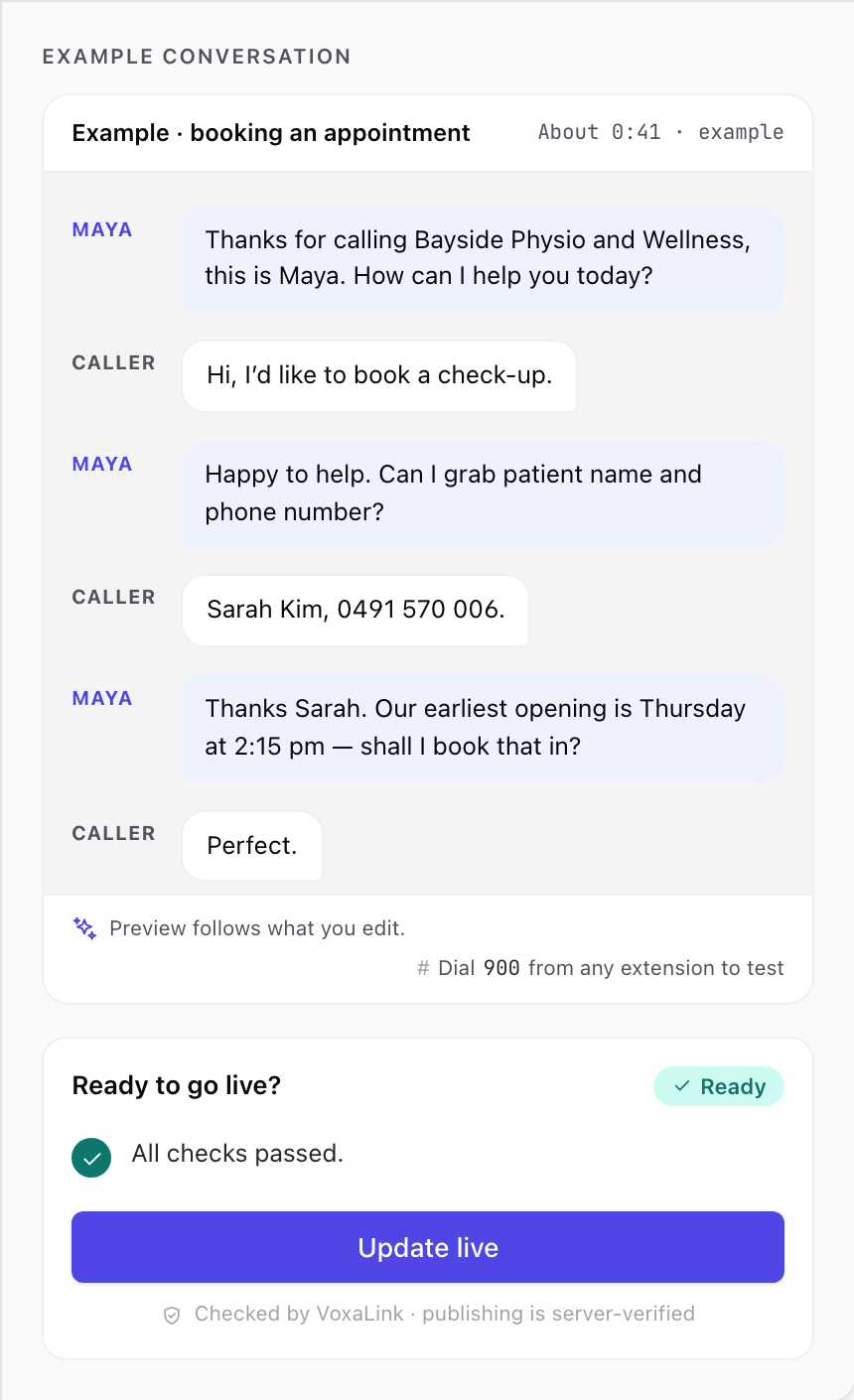
Example conversation
This is a short written sample of a call, built from your current settings. It picks a typical call for your agent: someone asking for a person, booking an appointment, asking a quick question or leaving a message. It follows your edits as you make them, so it's a quick way to see how your greeting and replies read. It's text only, with no audio, and the length shown is only an example.
Ready to go live?
This checklist shows the result of the checks on your last saved draft. The label at the top reads:
- Ready when everything passes.
- A number to fix when something would stop the agent publishing.
- A number of advisory notes when something is worth a look but won't stop you.
- Save draft to re-check while you have unsaved changes, because the checks run when you save.
Most items have a fix → link that takes you straight to the moment or setting that needs attention. The Publish or Update live button sits at the bottom of the checklist as well as in the top bar.
Publishing
- Press Save draft if you have unsaved changes. Publishing is only available once your draft is saved.
- Press Publish, or Update live if the agent is already live. A window opens with the same title.
- Read the window. It shows:
- a summary line with the agent's name, the number it will answer or that it's internal only, whether it uses Standard, Advanced or Grok, and its voice,
- the general-knowledge check, explained below,
- what publishing does to your phone numbers,
- anything that must be fixed first under Fix before publishing, each with a fix → link, or Everything checks out if nothing is blocking.
- Press Publish or Update live in the window. You'll see a message saying calls now use this setup.
For an answering agent, calls use the new setup straight away. For an outbound agent, its next campaign calls use it.
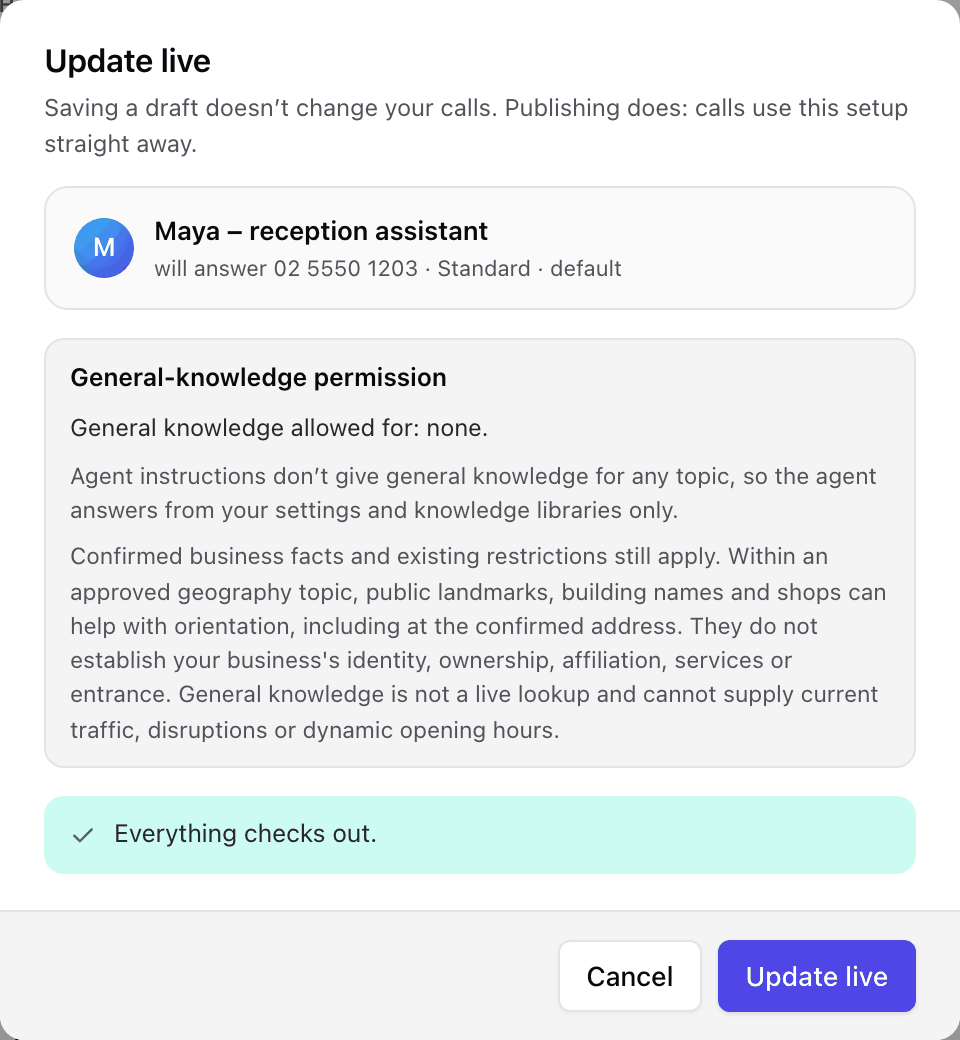
The general-knowledge check
Each time the window opens, the system reads your Agent instructions and works out which topics, if any, you've allowed the agent to use general knowledge for. You'll see Reviewing Agent instructions… for a moment, then General-knowledge permission with either the list of allowed topics, each quoting the words it came from, or "General knowledge allowed for: none." Pressing Publish confirms that reading. If it isn't what you meant, close the window, reword your instructions, save and try again. See Allowing general knowledge.
If the check fails, or the result has expired because you left the window open too long, a Retry button appears. The check is tied to the exact draft you saved, so if you change anything you'll need to save again first.
What publishing does to your phone numbers
If you've given the agent Its own phone number in How calls reach this agent, publishing points that number at the agent. If the number currently goes somewhere else, the moment warns you before you publish that the agent will take it over.
If the number is being used by a call journey or a call screener, publishing can't take it over. The window tells you where the number is in use. Change it there first, then publish.
If the agent is moving off a number it used to answer, the window tells you that number will stop reaching this agent and won't be assigned to anything. Give it a new home on the Phone numbers page afterwards.
What can stop a publish
The checks make sure a caller is never left stuck. Things that commonly need fixing:
- a phone number in use by a call journey or call screener,
- call recording switched on without a disclosure for the agent to speak,
- opening hours that are incomplete,
- a How it handles calls choice, such as Grok, that isn't available on your account.
The message names the problem. Use its fix → link, save, and publish again.
Testing an agent
There's no separate practice mode. You test the published agent with a real call. If you'd like to try a new answering agent before customers can reach it, leave How calls reach this agent on Internal only while you test, then choose its phone number and press Update live when you're happy.
Testing an answering agent
Once the agent is published, call it from any phone on your account by dialling its extension number. The footer of the Example conversation panel shows the number to dial, and so does Phone & connection in Settings. If the agent has its own phone number, you can also ring that number from a mobile.
Testing an outbound agent
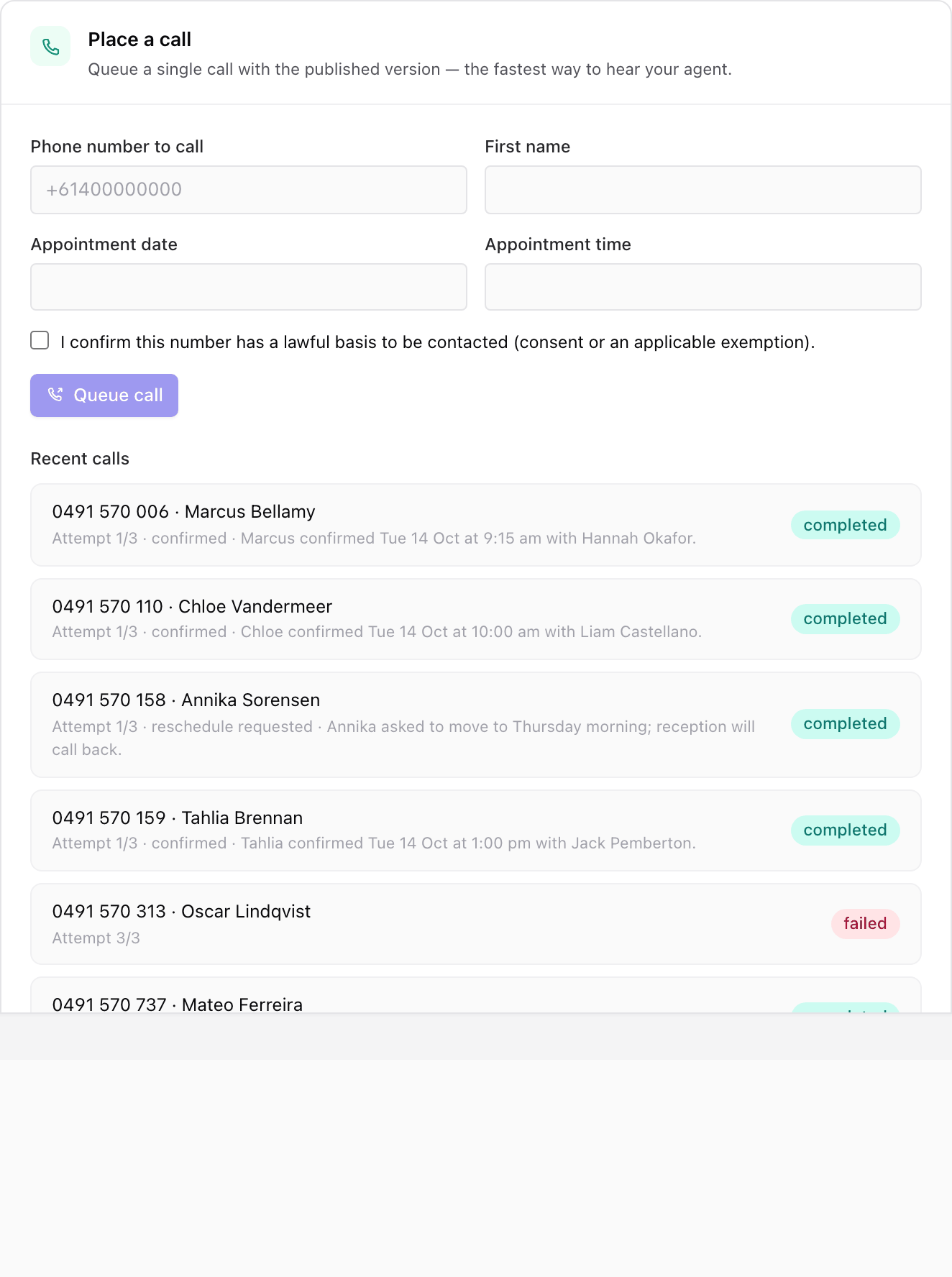
Outbound agents have Place a call in Settings, under Phone & connection. Before the agent is published it says to publish first.
- Enter the Phone number to call, such as your own mobile.
- Fill in any details the agent uses on its calls, such as the patient's name.
- Tick the box confirming the number has a lawful basis to be contacted.
- Press Queue call.
Recent calls underneath lists each test with its progress and outcome. Press Cancel to stop a call that's still waiting to go out. To call a whole list, use a campaign.
What to listen for
- Does the greeting sound right, with the right name and voice?
- Does it answer correctly from your knowledge, and admit when it doesn't know?
- Does a booking row check the calendar and book the slot?
- Does it collect each detail in a sensible order and read back numbers correctly?
- Does it hand over to a person cleanly when asked?
- Does the task that arrives afterwards contain what your team needs?
When live calls run an older setup
Occasionally VoxaLink improves how voice agents run. When that happens to a live agent, a yellow bar appears across the top of the agent: Live calls are running an older setup, with the reason. Press Update live to bring it up to date, or Later to hide the bar for now. Your agent keeps working on the older setup until you do.
Version history
Every save creates a version. In Settings, Version history lists your most recent versions. Each shows its number, when it was saved and published, and a status such as Published, Draft, Archived or Restored. The version callers are reaching is marked Live.
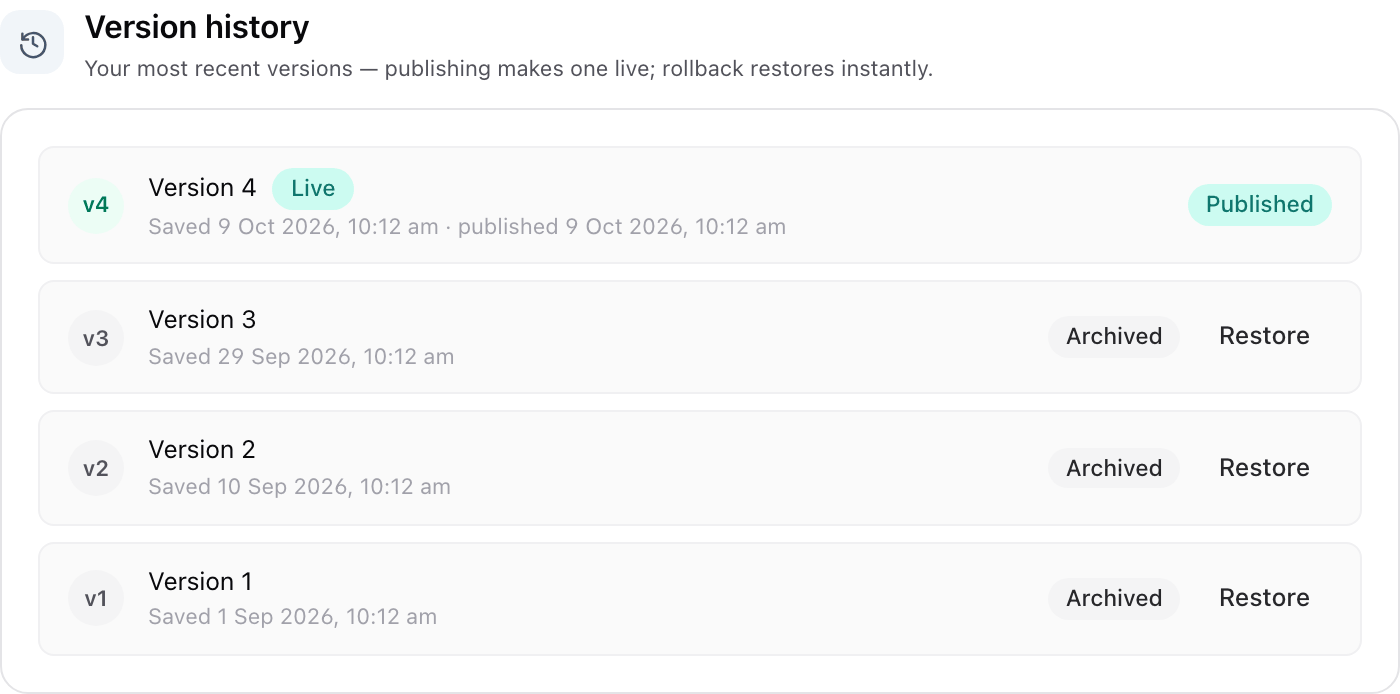
To undo a published change, press Restore on an earlier version that offers it. That version goes back to being the live one straight away. A version created by a restore shows the status Restored.
Taking an agent off a number
To stop an answering agent taking calls on one of your phone numbers, open How calls reach this agent, choose Internal only, press Save draft, then Update live. The publish window confirms the number will stop reaching the agent. Then send the number somewhere new on the Phone numbers page.
Anything else that sends calls to the agent's extension, such as an auto attendant key, keeps doing so. Change those too if you want the agent to stop receiving calls altogether. To remove the agent completely, see Deleting an agent.
Everyday tasks
- Save my changes without affecting callers → press Save draft.
- Throw away changes I haven't saved → press Discard changes in the bar at the bottom.
- Make my changes live → save, then press Publish or Update live. See Publishing.
- Find out why I can't publish → read Ready to go live? and use the fix → links.
- Try an agent before customers reach it → keep it Internal only, publish, and dial its extension. See Testing an agent.
- Undo a change that made things worse → press Restore on an earlier version in Version history.
- Stop an agent answering a number → see Taking an agent off a number.