
Campaigns
Have an outbound voice agent call a contact list for you, with a call window, retries, an opt-out check and a review before launch.
A campaign has an outbound voice agent call a list of people for you: appointment reminders, follow-ups after a first visit, or a round of feedback calls. You upload the list, choose when calls may happen, check what will be dialled, and launch. The agent does the talking, and the campaign page shows how each call went.
A campaign reuses an agent you have already built and published. The agent holds the script, and the campaign holds the contact list, the timing and the number calls come from. One agent can run any number of campaigns, so Bayside Physio's appointment-reminder agent can run a fresh campaign each week with that week's list.
A campaign is not a test call To hear how an outbound agent sounds, use the testing options described in Testing and publishing. A campaign calls real people on a real list.
Before you start
You need:
- A published outbound agent, meaning an agent created with Make outbound calls. See Voice agents overview to create one.
- A phone number on your account for calls to come from. Phone carriers reject calls with no caller ID, so a campaign can't launch without one. See Phone numbers.
- A contact list saved as a CSV file, with a column of phone numbers and a column for anything else the agent says, such as the person's name or appointment time.
The Campaigns page
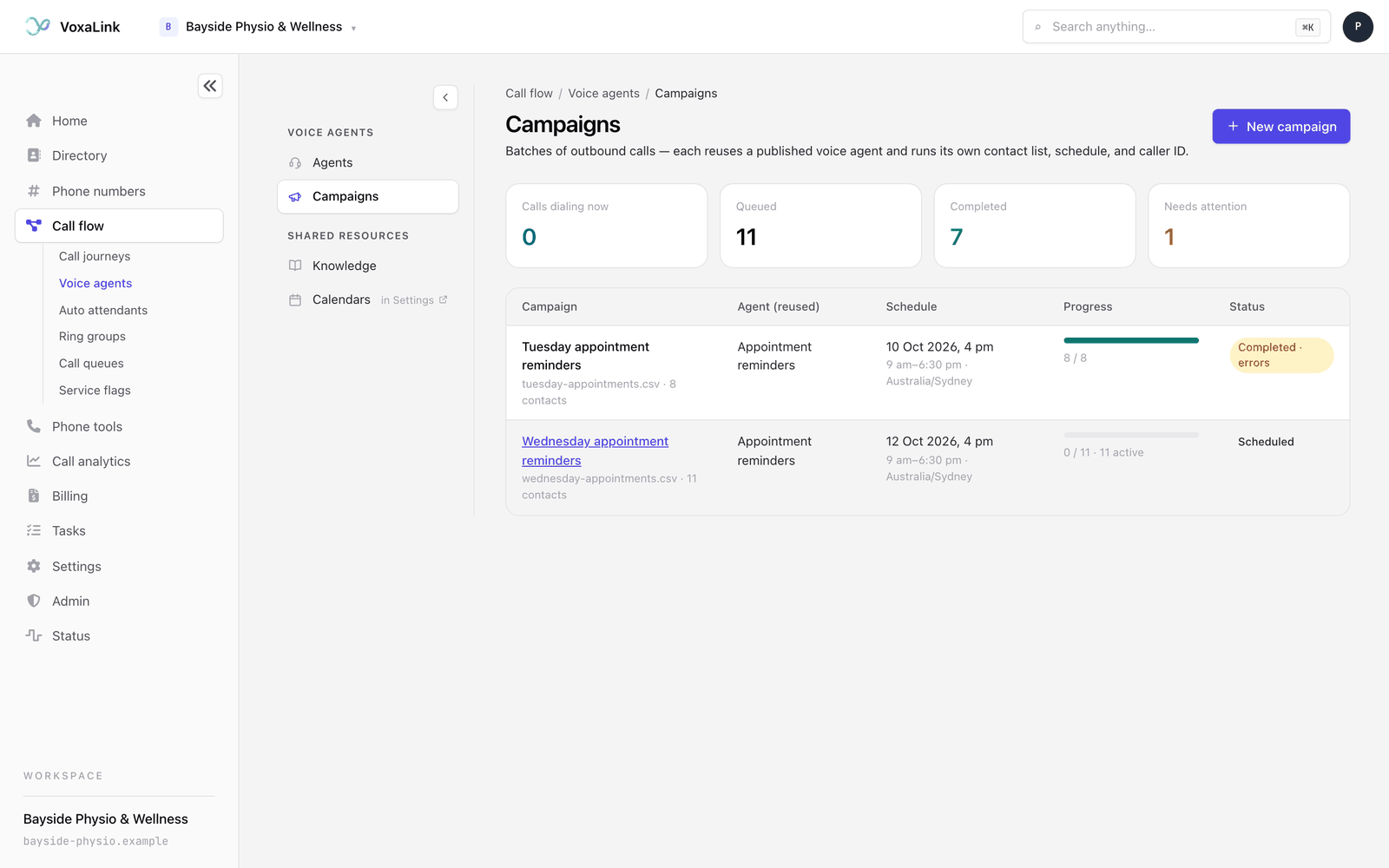
In Voice agents, click Campaigns in the panel on the left. The page lists every campaign across all your outbound agents.
Four tiles across the top count Calls dialing now, Queued, Completed and Needs attention. Below them, each campaign shows its name, contact list and size, the agent it reuses, its start time and call window, a progress bar, and a status: Scheduled, Running, Completed, Completed · errors, Failed or Cancelled.
If you have no published outbound agent yet, the page says No outbound agents yet and offers New voice agent instead.
Start a new campaign
There are two ways in:
- On the Campaigns page, click New campaign.
- From an outbound agent, click Campaigns at the top of the editor. That view lists the agent's own campaigns, each with a View outcomes button. Click Launch a campaign, which is greyed out until the agent is published. That agent is chosen for you. Click Use a different agent if you want another. Back to the agent returns you to the editor.
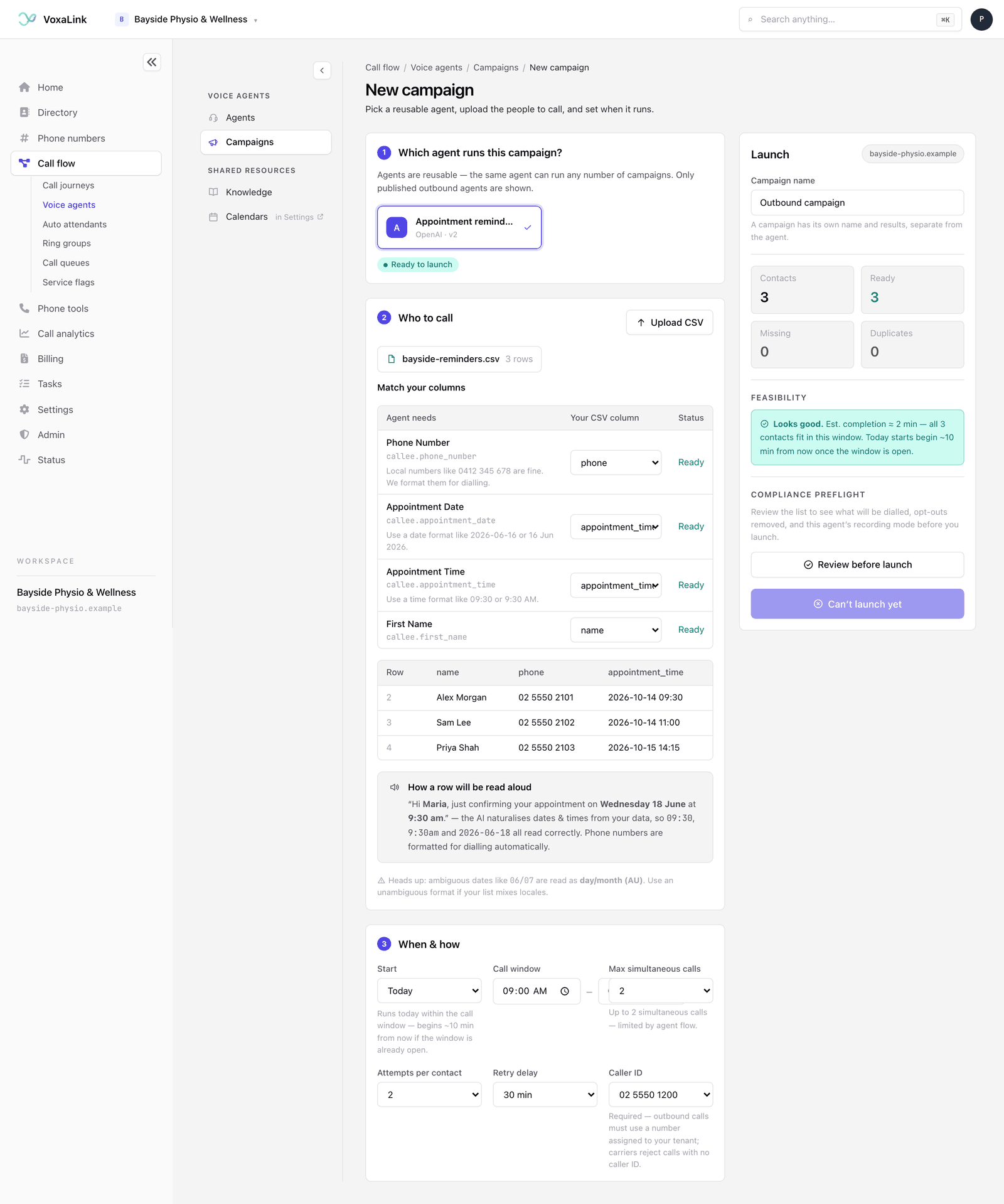
The new campaign page has three numbered steps on the left and a Launch panel on the right.
1. Which agent runs this campaign?
Click the agent you want. Only published outbound agents are listed. A line under it tells you whether the agent is ready to launch.
2. Who to call
- Click Upload CSV and choose your file. The first row must be the column headings. A list can have up to 1,000 contacts.
- Under Match your columns, each thing the agent needs is listed on the left, starting with the phone number. Pick the matching column from your file for each. The Status column shows Ready, or how many rows are missing that value.
- Check the first five rows of your file, shown underneath, to make sure the right data came in.
Phone numbers can be written the way you normally would, such as "0412 345 678". They are formatted for dialling for you. Dates and times can be written in common formats like "09:30" or "16 Jun 2026", and the agent reads them out naturally. A date like "06/07" is read as day then month, so use an unambiguous format if your list mixes countries.
3. When and how
- Start: Today, or Scheduled date to pick a day. A campaign started today begins about 10 minutes from now if the call window is already open.
- Call window: the daily hours calls may be placed. It starts at 9 am to 5 pm. The form doesn't show a time zone. The window uses the time zone of the computer you launch from, so check your computer's clock is set to the zone you mean. Once the campaign exists, its list and its page show that time zone next to the window.
- Max simultaneous calls: how many calls run at once. It starts at 3 where your limit allows. The note underneath tells you the most you can choose and what sets that limit, for example "Up to 5 simultaneous calls", followed by the reason. The reason can be your phone line capacity, your account's budget, the agent's own Max calls at once setting, or the platform maximum. If VoxaLink can't confirm the limit yet, the note says the figure is estimated and gets checked when you launch. Start low and raise it once you've seen a campaign run smoothly.
- Attempts per contact: 1 to 5 tries for each person. It starts at 2.
- Retry delay: how long to wait before trying someone again, from 5 to 120 minutes. It starts at 30.
- Caller ID: the number your calls come from. Choose one of your account's numbers.
Which call results are worth another try, such as No answer, Busy or Reached voicemail, is set on the agent itself, in its If they don't answer moment.
Check and launch
The Launch panel on the right fills in as you go.
- Give the campaign a Campaign name, such as "Reminders, week of 12 October". It starts as "Outbound campaign". The campaign keeps its own name and results, separate from the agent.
- Check the counts: Contacts, Ready, Missing and Duplicates. Every row must have the values the agent needs before you can launch.
- Read Feasibility. It says Looks good with an estimated finish time, or warns you. Can't fit this campaign means the list is too long for the window at this many simultaneous calls, so widen the window, allow more calls at once, or split the list. Some attempts may not be met means retries won't all fit in one day's window and the rest roll over to the next day.
- Click Review before launch. VoxaLink checks the list against your opt-out list and shows exactly what a launch would do: Recipients parsed, Callable after opt-outs, any opt-outs, invalid numbers or duplicates removed, the Caller ID, the Call window, an estimated cost and the agent's Recording setting.
- Tick the box confirming you have a lawful basis to contact everyone on the list, through consent or an applicable exemption. If the agent records whole calls, a second box asks you to acknowledge your recording-disclosure obligations.
- Click Launch campaign.
Until everything is in place, the button reads Can't launch yet. If you change the list, the column matching or the caller ID after reviewing, the review and your ticks are cleared, and you need to click Review again.
Check before you launch Nothing in the portal pauses or stops a campaign once it has launched. The campaign page only shows progress. A launched campaign works through its list within the call window, so reviewing first is your chance to catch a wrong list, number or window.
Opt-outs
People on your opt-out list are never called. They are removed when you review the campaign, and checked again just before each call, so someone who opts out partway through a campaign isn't called later in it.
Watch a campaign run
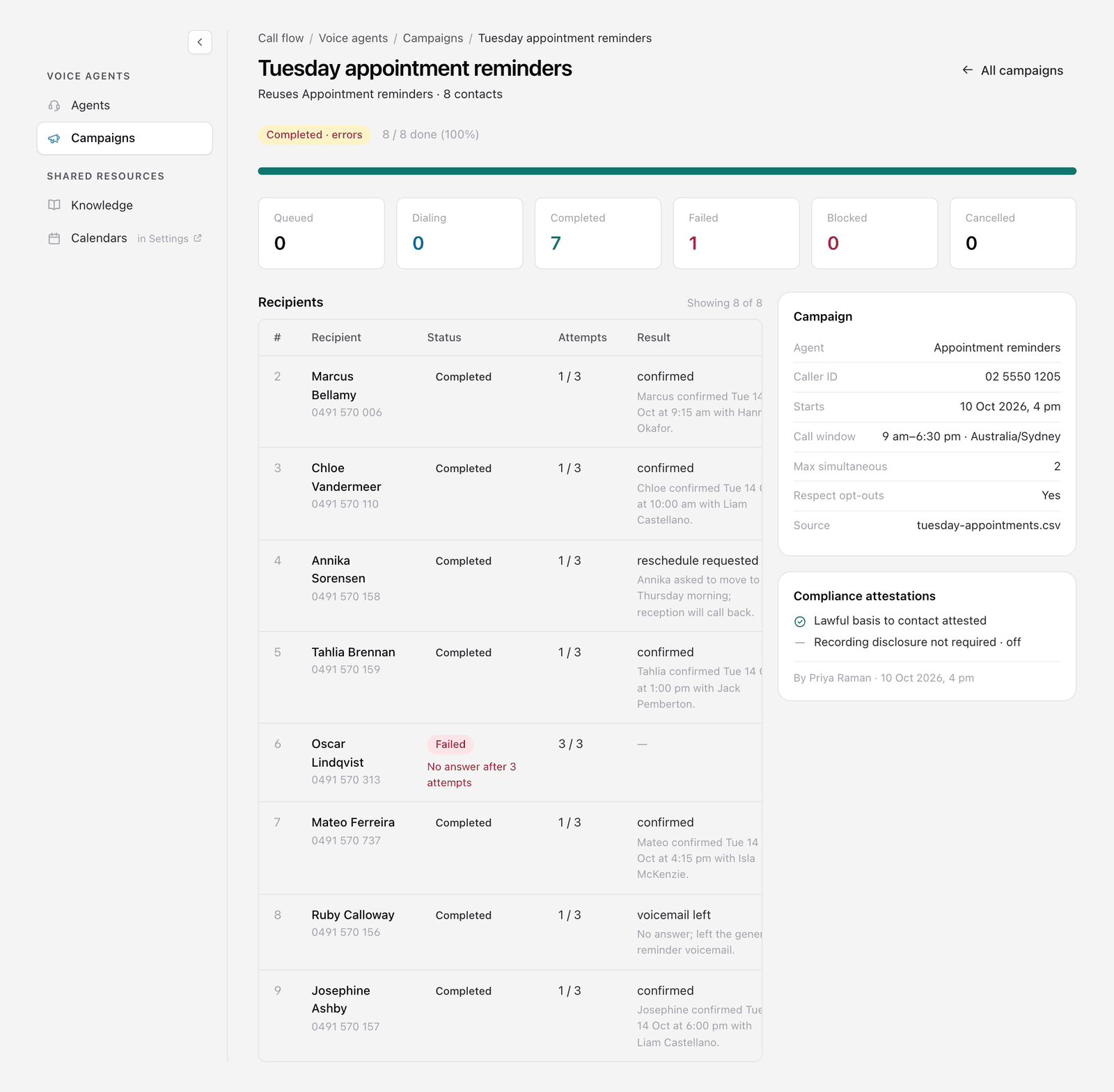
Click a campaign's name to open it. The page shows its status, a progress bar, and counts for Queued, Dialing, Completed, Failed, Blocked and Cancelled.
Below that:
- Recipients lists each person with their status, how many attempts were made, the result with a short summary of the call, and how long it lasted.
- Skipped for opt-out lists anyone on your uploaded list who was left out because they had opted out. They never received a call.
- The Campaign card repeats the agent, caller ID, start time, call window and simultaneous calls you chose.
- Compliance attestations records what was confirmed at launch, by whom and when.
Everyday tasks
- Call a list of patients with reminders → publish an outbound agent, then start a new campaign with the list.
- Avoid calling too early or too late → set the Call window in When and how.
- Keep your lines free for incoming calls → keep Max simultaneous calls low.
- Check the list is clean first → click Review before launch and read the counts. See Check and launch.
- Change which results get a retry → open the agent and edit its If they don't answer moment.
- See how a campaign went → open it from the Campaigns page. See Watch a campaign run.