
Phone numbers
See your phone numbers, choose what answers each one, and set which number your outgoing calls show.
Phone numbers is where you see every external number your business owns and decide what answers each one. It has two tabs that cover both directions of calling:
- Numbers lists the numbers people dial to reach you, and what each one rings.
- Dial plans holds the rules for how outbound calls leave your phone system. See Dial plans.
Numbers
Each external number is sometimes called a DID, short for "direct inward dial". It's simply a phone number that rings into your phone system. The Numbers tab lists them all, with a filter box above the table. Type part of a number or a name into Filter by number or account… to narrow the list. The count beside it reads, for example, "3 of 5", which is how many of your numbers match out of all of them.
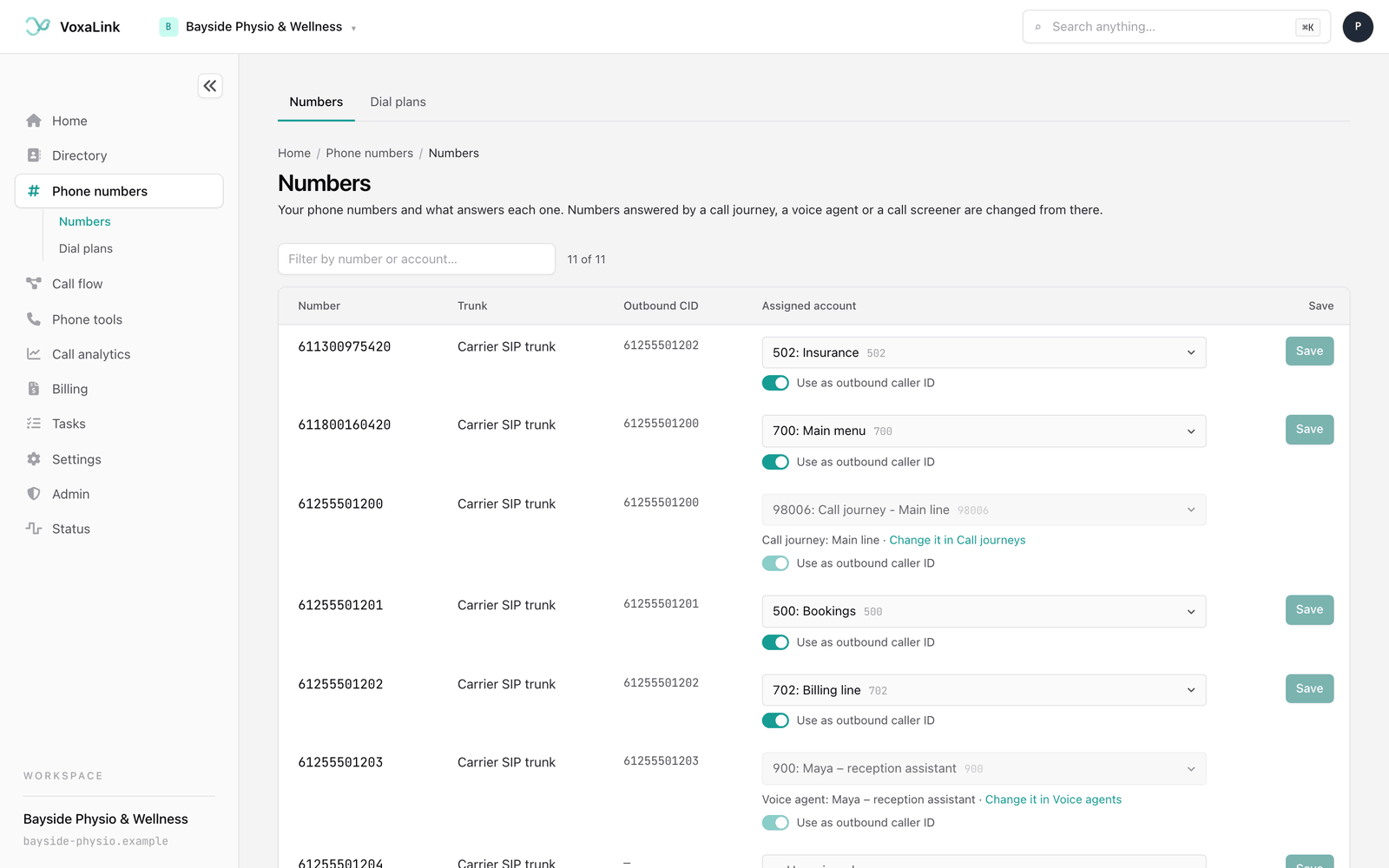
Each row shows:
- Number: the external number itself, shown exactly as it is stored, so it may not be spaced the way you would write it.
- Trunk: the carrier connection the number arrives on. It's shown for reference only.
- Outbound CID: the caller ID this number presents on outgoing calls, if any.
- Assigned account: what rings when someone dials the number, with a line underneath when something else manages it.
- Save: saves that row. Each row saves on its own.
Who can answer a number
A number can be answered by any of these:
- A person, on their own extension.
- A ring group, which rings several phones.
- A call queue, which holds callers until someone is free.
- An auto attendant, a menu where callers press a key.
- A call journey, which answers differently by time of day and covers holidays.
- A voice agent, an AI assistant that talks with callers.
The first four are assigned right here on this page. Call journeys and voice agents claim a number from their own pages, and while they hold it, this page shows who has it and points you there.
Which one should answer? For a main number, a call journey is usually the best choice. It handles opening hours, lunch breaks, public holidays and after-hours messages for you, and can still put calls through to a person, a ring group, a queue or an auto attendant. Assign a number straight to a person or group here when it should always ring the same place, day and night.
Assign a number to a person, group, queue or auto attendant
- Find the number in the list.
- In Assigned account, choose where it should ring. The list holds your people, ring groups, call queues, auto attendants and other phone-system accounts you can route to.
- Click Save on that row. The button reads Saved once it's done.
The change takes effect straight away. To change where a number rings, pick something else and save again.
Choose Unassigned, the empty choice at the top of the list, for a number you own but aren't using yet. Calls to an unassigned number aren't answered, so only do this for a number nobody should be calling.
Numbers held by a call journey or voice agent
When a call journey or voice agent answers a number, the row is locked. The Assigned account list and the caller ID switch are greyed out, there's no Save button, and a line under the list tells you who has it and where to change it:
- Call journey: followed by the journey's name, with Change it in Call journeys. Sometimes the line reads "held by the call journey" followed by the name, with the account the number points to first.
- Voice agent: followed by the agent's name, with Change it in Voice agents. "(not published)" after the name means the agent isn't live yet.
- Call screener or Reservation agent, followed by an extension, when the mobile app's AI assistant answers it. The line says Turn it off in the mobile app when that's where it's changed.
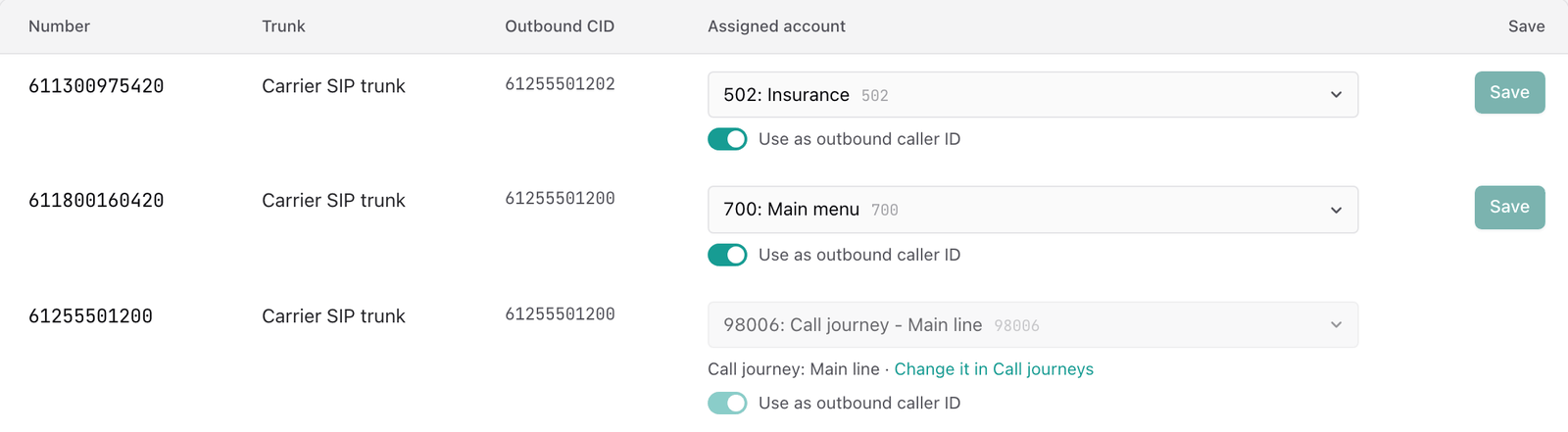
The lock is there so two pages can't fight over one number. Here's how each one claims and releases a number:
- Call journeys take a number when you assign it to the journey. If a person, group, queue, voice agent or another journey answers it today, the journey shows who answers it now and who will after, and asks you to tick that you want to move it. Turning the journey off, or deleting it, leaves the number unassigned. It then shows here as Unassigned, ready for you to assign again. See Call journeys.
- Voice agents take a number when you publish an agent set to answer its own phone number. Publishing can take over a number that rings a person, group, queue or auto attendant today, and the agent's page warns you first. It can't take a number a call journey or call screener holds. Release it there first. See Voice agents.
- Auto attendants, ring groups and call queues never claim a number themselves. You point a number at them on this page, or choose them as who answers in a call journey.
The picker on this page also leaves out voice agents, call journeys and call screeners. You can't point a number at one of them from here, because they claim numbers from their own pages.
A line may also say changed elsewhere, with a Change it there link when there is one. Two other lines mean VoxaLink couldn't work out what answers a number: Couldn't check what answers this number, and one saying VoxaLink can't tell for certain what answers this number. In both cases nothing is changed automatically. Try again in a minute, or ask your administrator to check the number in the phone system. If you press Save while a check can't be made, the row tells you nothing was changed.
Outbound caller ID
Caller ID is the number the person you call sees on their screen. Turn on Use as outbound caller ID in a number's row, then Save, to have the assigned person's outgoing calls show this real, callable number instead of an internal extension. The Outbound CID column then shows it.
Which numbers a person is allowed to show is set on their page in Directory, under Numbers and caller ID. If someone's calls still show the wrong number, check there as well.
Adding numbers
If your account can buy numbers through the portal, an Add numbers button appears at the top of the Numbers tab. It lets you search for available numbers by area and add them to your account. A number you've bought but not switched on yet shows in a warning box above the table that starts with Purchased, with an Activate button.
Everyday tasks
- Point a number at a person → find it on Numbers, set Assigned account to their extension, click Save. See Assign a number.
- Send a number to your phone menu → assign it to the auto attendant and save.
- Answer a number differently after hours and on holidays → set up a call journey and assign the number to it there.
- Change a number a journey or voice agent answers → follow the Change it in link under the row. See Numbers held by a call journey or voice agent.
- Make someone's outbound calls show a real number → assign the number to them, turn on Use as outbound caller ID, save, then check their allowed caller IDs in Directory.
- Keep a number for later → leave it on Unassigned.
Next: Dial plans, the rules for how outbound calls leave your phone system.