
Ring groups
Ring a team on one number, in up to three stages, with a final stop for calls nobody answers.
A ring group rings several phones for one call, so a team can share a single number. Use one for reception, a team of physios, or anyone who should all be reachable together. The call rings the group, and whoever answers first takes it. Ring groups are also known as hunt groups.
You'll find ring groups under Call flow in the sidebar. Calls keep using your saved settings until you press Save changes, so you can try things out without affecting anyone.
Ring group or call queue? A ring group rings a set of phones and connects the first person to answer. There's no line, no hold music and no waiting. A call queue holds callers in line with music and announcements, then hands them to the next free person. Choose a ring group when a call should simply ring the team. Choose a queue when callers should wait their turn.
How a ring group works
A ring group rings people in stages:
- Before anyone rings, the group checks your special rules. A rule can send the call somewhere else, for example on a public holiday.
- Stage 1 rings its people for a set number of seconds.
- If nobody answers, stage 2 rings, then stage 3. You can have up to three stages, and each one can ring different people.
- If still nobody answers, the call goes to the Final stage, a single place you choose, such as a person, a call queue or an after-hours menu.
Within a stage, everyone who's available rings at once, unless you choose to ring only the person who has been free the longest. A phone that's busy or switched off is skipped. Keep each stage to a few people rather than ringing the whole office at once.
The ring groups list
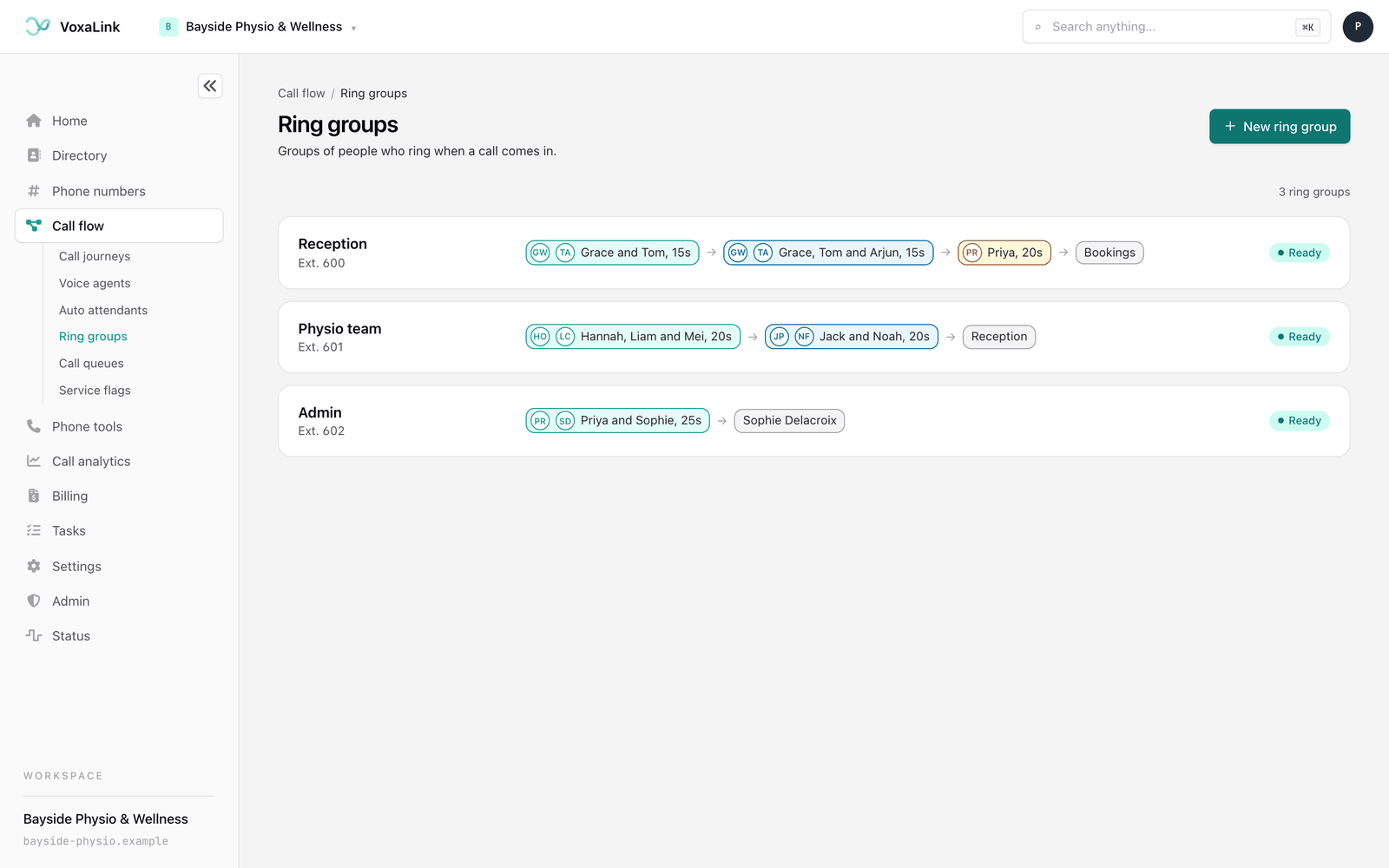
The list shows each group with its name, its numbers, and who rings in order: each stage shows the people's first names and how long it rings, followed by the final stage.
A label on the right tells you whether the group is complete. Ready means every stage has someone in it and a final stage is chosen. Needs a look means something is missing, such as an empty stage or no final stage. Click a group to open it.
A count such as "3 ring groups" sits above the list. Once you have more than eight groups, a search box appears next to it. Type a name or a number to narrow the list, and press Clear search if nothing matches. Until you create your first group, the page shows No ring groups yet with a New ring group button.
Creating a ring group
- Press New ring group at the top of the list.
- Pick a Starting point:
- Ring everyone together gives you one stage where everybody rings at once.
- Ring one team after another gives you three stages, one after the other.
- Team first, then a backup gives you two stages, then the final stage.
- Start empty lets you build it yourself.
- Type a Display name, such as "Reception".
- Type an Account number(s). This is the internal number callers dial to reach the group. It must be 3 to 15 digits and not used by anything else. You can add more numbers later.
- Press Create ring group.
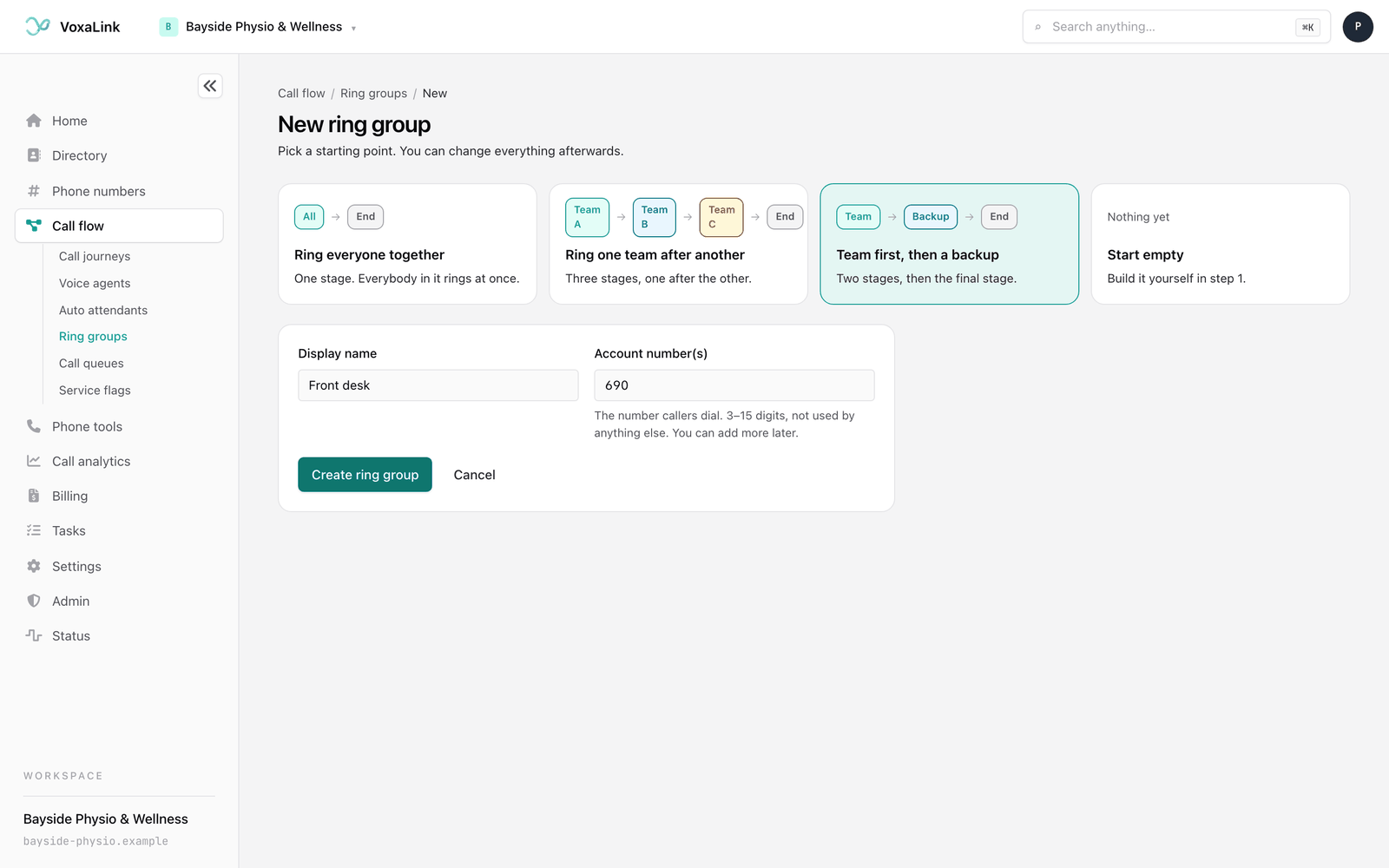
The group is created on your phone system as soon as you press Create ring group. You then land on step 1, Who rings, with the stages from your starting point ready to fill in. Those stages are only a draft until you add people and press Save changes.
To give the group a public phone number, point one of your numbers at it from Phone numbers.
The ring group workspace
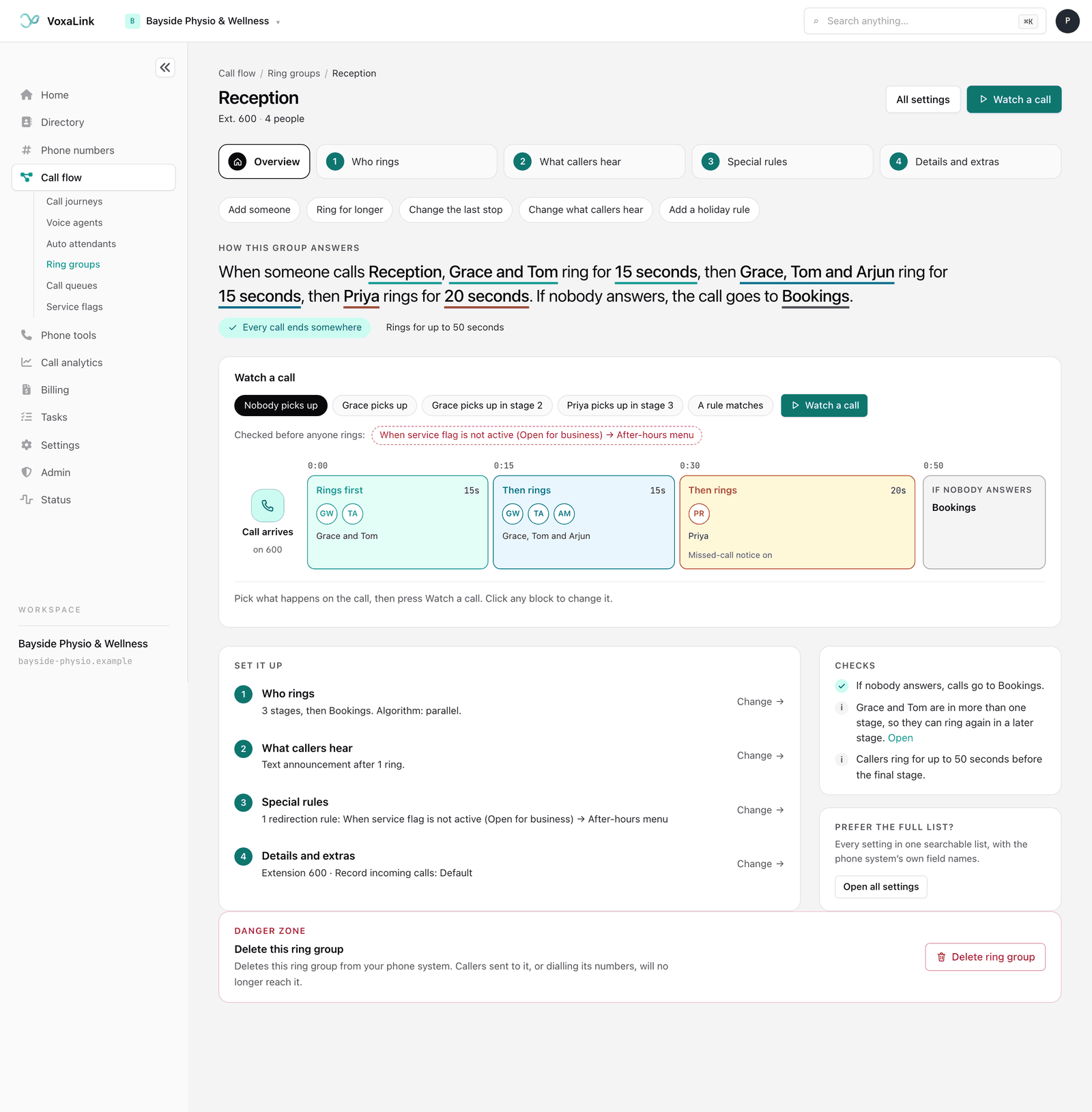
When you open a group, you start on its Overview. The top of the page shows the group's name, its numbers and how many people are in it, with two buttons: All settings and Watch a call.
Below that, a row of steps takes you through the settings: Overview, then 1 Who rings, 2 What callers hear, 3 Special rules and 4 Details and extras. A step that needs attention shows a small warning triangle instead of its number. Inside each step, the buttons at the bottom take you to the previous or next step, and the last one takes you Back to overview.
The overview has:
- Quick changes, buttons for common jobs such as Add someone, Ring for longer, Change the last stop, Change what callers hear and Add a holiday rule. Each one opens the right step.
- How this group answers, one sentence that says who rings first and for how long, who rings next, and where the call goes if nobody answers. Click any underlined part to change it.
- A label saying either Every call ends somewhere or how many things there are to look at, and how long callers can ring for in total.
- Watch a call, an animated picture of the group, described below.
- Set it up, the four steps with a one-line summary of each. Press Change to open one.
- Checks, a list of things that are fine and things to fix, such as "Stage 2 has nobody in it." Press Fix to go straight to the problem.
Watch a call
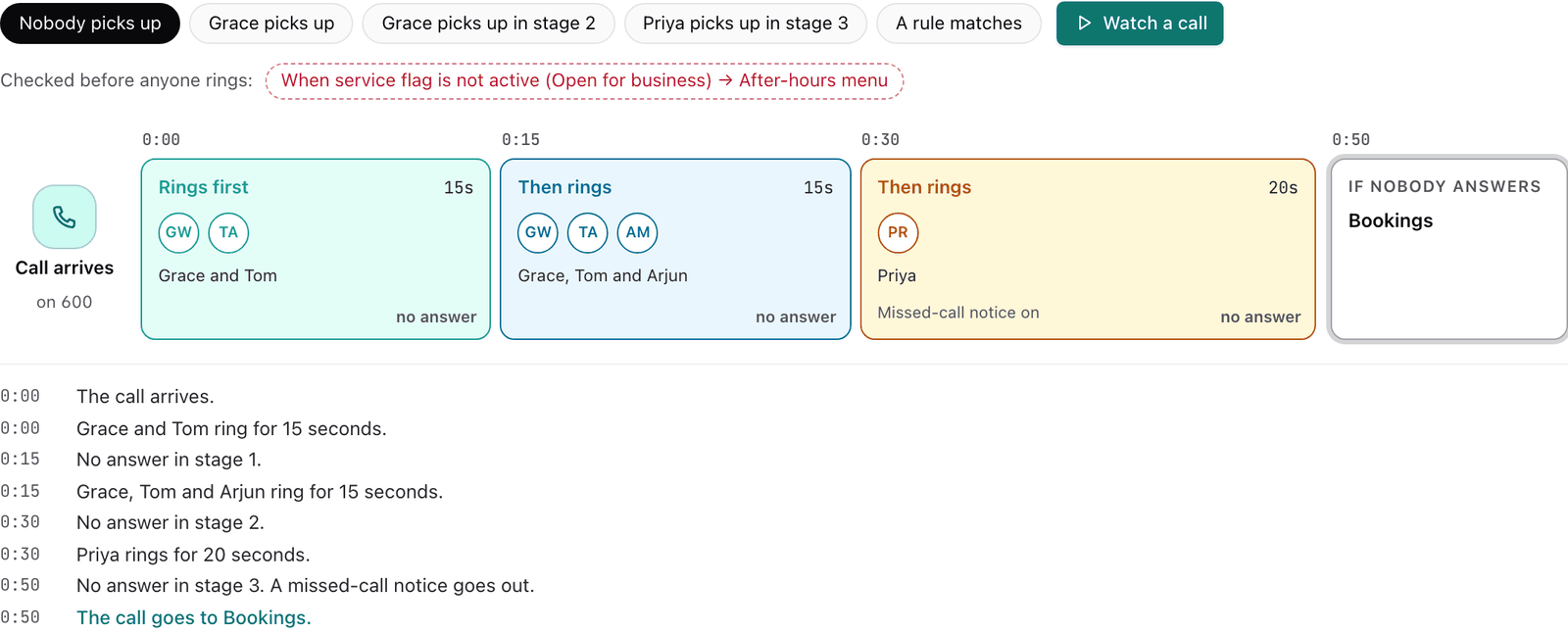
Watch a call shows your ring group as a timeline. The call arrives on the left, each stage is a coloured block sized by how long it rings, and the final stage sits on the right. It's a simulation of your settings. It doesn't ring anyone or contact your phone system.
- Pick what happens on the call: Nobody picks up, a named person picks up in a given stage, or A rule matches if you have special rules.
- Press Watch a call.
A marker moves through the stages while the people in each stage pulse as they ring. Below the timeline, each moment is written out with its time, such as "0:15 No answer in stage 1." The call ends with the person who answers, or with the final stage. The timeline runs much faster than a real call, so a minute of ringing takes a few seconds to watch.
A few things to know:
- The Watch a call button at the top of the page takes you to the overview and plays straight away.
- It always uses the settings on screen, including changes you haven't saved yet.
- A stage with no duration uses the phone system's default time, which the picture draws as 20 seconds.
- A rule matches shows what happens when your first rule applies. The other rules aren't simulated.
- Click any block to go and change it.
Step 1: Who rings
This step decides who rings, in what order, for how long, and where the call goes if nobody answers. A Live preview at the top shows the same timeline as Watch a call and updates as you edit.
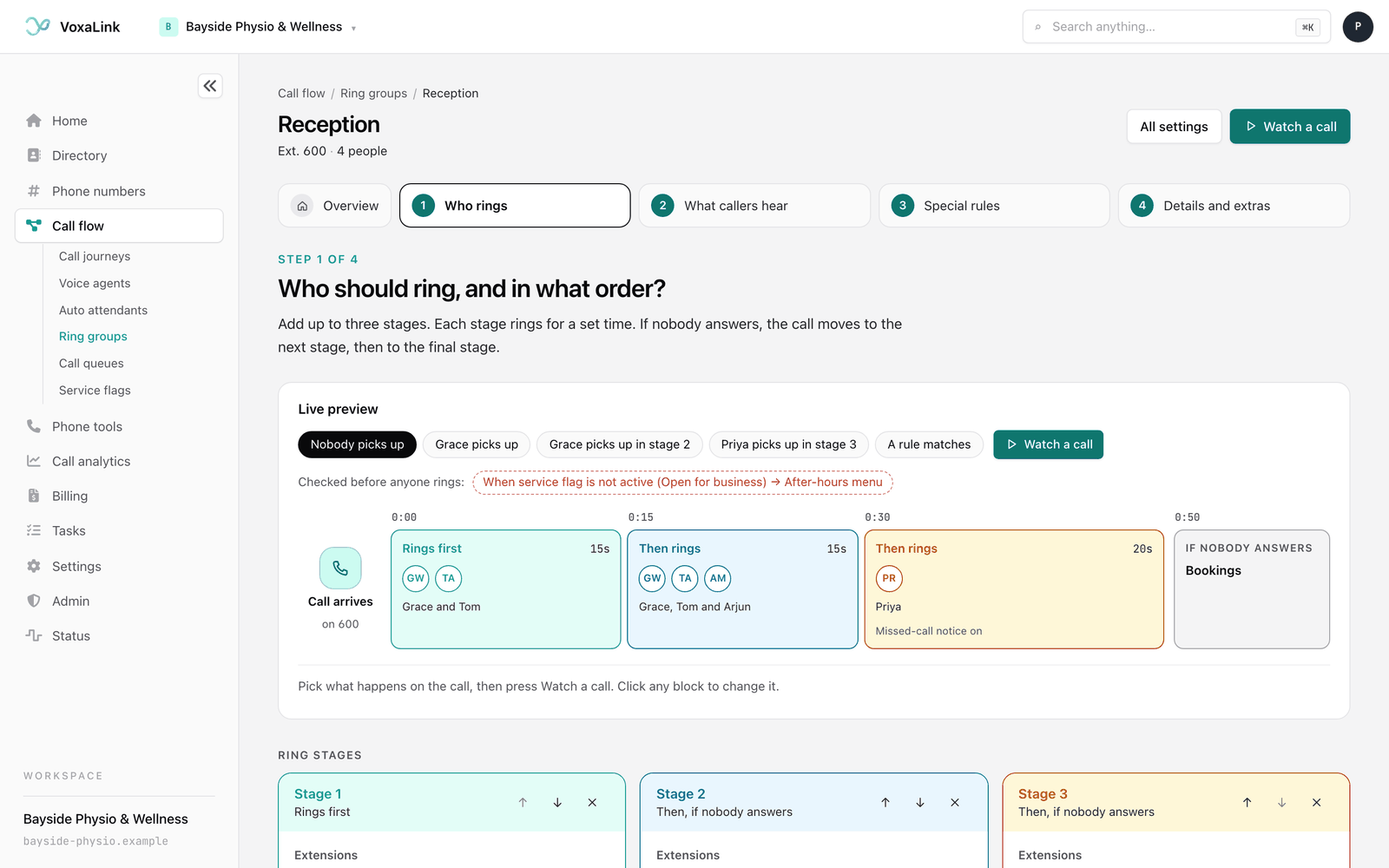
Under Ring stages, each stage is a coloured card:
- Extensions are the people who ring in this stage. Pick them from the list.
- Duration is how many seconds the stage rings before moving on. Use the slider or type a number. Leave it blank to use the phone system's default.
- Missed call sends a missed-call notification if nobody in this stage answers.
Use the up and down arrows on a stage to ring it earlier or later, and the X button to remove it. Press + Add another stage to add one, up to three. A person can be in more than one stage, in which case they ring again in the later stage, and the page points this out.
Final stage is where the call goes if nobody in the stages answers. Pick anywhere from the list, such as a person, a call queue or an auto attendant. Without one, a call nobody answers has nowhere to go, so the page warns you.
Algorithm decides how people within a stage ring:
- All available agents: everyone available in the stage rings together, and the first to pick up gets the call.
- Select most idle agent per stage: each stage rings only the person who has been free the longest.
If you prefer to see the stages in a grid, open Show it as a table.
Step 2: What callers hear
Callers hear ringing while the group's phones ring. A bar at the top of this step shows a caller's first moments, so you can see when any message plays.
Under Announcement while ringing, choose:
-
None: callers hear ringing only.
-
Text: type a short message and the phone system reads it out. If you're not sure what to say, press Use suggested wording.
-
File: a label shows where the recording stands: Recording saved, Not saved yet, Removed when you save or No recording. Press Choose file… to upload a recording. Press Generate with AI to make a natural-sounding recording from your words. Hover over the button to read what it does: it makes a recording of the announcement with an AI voice, and the recording goes to the phone system when you save.
The Generate with AI voice window asks What should the voice say?. Type your words, press Generate voice, listen, then press Use this recording (or Regenerate to try again). It uses the voice set in your workspace's AI recording settings under Settings, and nothing is saved until you press Save changes on the page. Once a recording is saved, Play lets you listen to it and Remove recording takes it off. Undo remove brings it back before you save.
If you add a message, Number of rings before announcement sets when it plays. 0 plays it straight away. After the message, callers hear ringing again.
Under Sounds:
- Ringback source is what callers hear while the group rings.
- Music on hold source plays when a team member puts the caller on hold.
Step 3: Special rules
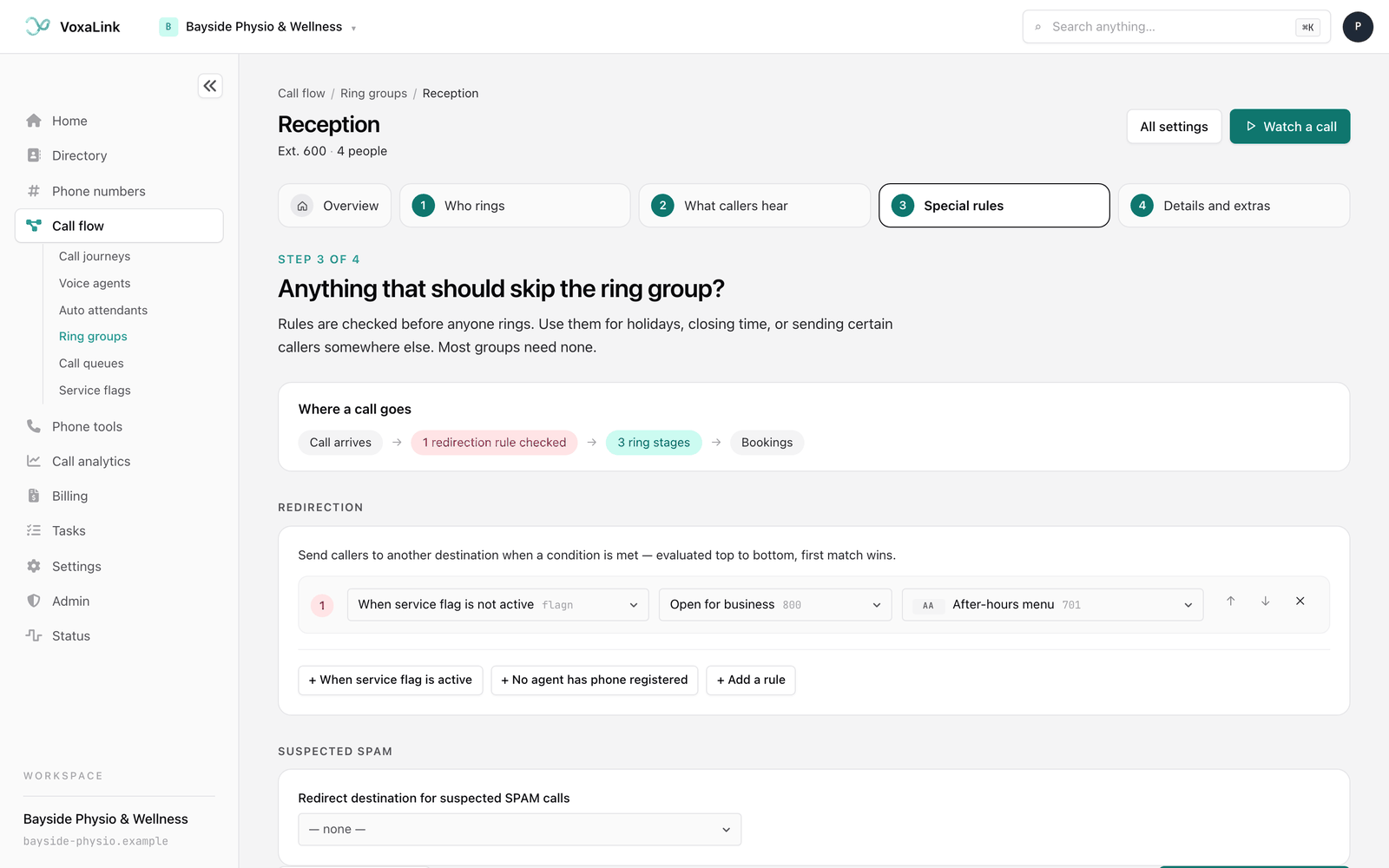
Rules are checked before anyone rings. Use them for holidays, closing time, or sending certain callers somewhere else. Most groups don't need any. A short line at the top shows the order: the call arrives, the rules are checked, then the stages ring, then the final stage.
Under Redirection, each rule has a trigger, a setting for that trigger, and a destination. The phone system checks rules from top to bottom, and the first one that matches wins. The triggers are:
- When service flag is active and When service flag is not active, which follow a service flag, an on/off switch such as "Public holiday" that can run on a schedule.
- Always, which sends every call to the destination.
- No agent has phone registered, which applies when none of the group's phones are connected to the phone system.
- Caller in address book and Caller not in address book. For the first, pick the address book category.
- Internal Call and External Call, for calls from inside or outside your business.
- Use call forward all from extension.
To add a rule, press + When service flag is active, + No agent has phone registered or + Add a rule. For the destination, pick anywhere from the list, or choose Custom number… to type an outside number. Use the up and down arrows to check a rule earlier or later, and the X button to remove it. A rule without a trigger or destination is marked as unfinished and isn't saved.
Under Suspected spam, Redirect destination for suspected SPAM calls sends calls the phone system flags as spam to a place you choose instead of ringing the group.
Step 4: Details and extras
Nothing in this step is needed to take calls, so change only what you need.
The Identity section covers how the group is reached and named:
- Account number(s) are the numbers that reach the group. Type a number and press Enter to add it, then add as many as you need. Changing these numbers can change the group's address in the portal. If it does, you'll return to the list after saving, and the group appears there under its new number.
- Name (e.g. "Group 1"), Short name and Pronunciation control how the group is named on screens and spoken by the computer voice.
- Caller ID is the number shown when the group sends a call to an outside number.
- Note field is for your own notes.
On your team's phones covers what happens on the phones that ring:
- From-header decides what your team's phones show when a group call rings: the caller's own details with Calling-Party, or one of the Group name options so staff know the call came through the group.
- Ring melody for direct call to extension picks a ringtone so group calls sound different from direct calls.
- Page incoming calls announces each new call over a paging group.
- Switches for less common behaviour. Most have a short explanation on screen: Disable Cell Forking stops group calls also ringing team members' mobiles, Follow redirect all setting forwards group calls for anyone who forwards all their calls, Allow agent connect webhook notifies a connected system when someone answers, Enable call pickup from extension BLF lets other phones pick up a ringing group call with a button, and Allow agents to divert incoming calls lets a team member pass a ringing call on. Behave like a shared line and Call waiting on extensions are here too. Call waiting on extensions is on by default.
Recording and reports covers recordings and emails about the group's calls:
- Record incoming calls to ring group sets whether calls through this group are recorded. Default follows your account-wide setting. Tick Record to record audio. If transcription is turned on for your account, a Transcribe box appears once Record is ticked. See Call analytics.
- Send email about missed calls to emails the addresses you add whenever a group call goes unanswered.
- Send daily CDR report to, Send daily CDR report at (24 hour format, 15 minute intervals) and Send nightly CDRs as email a daily list of the group's calls, at the time and in the format you choose.
- CRM account lets you pick one of your people to tie the group to a CRM connection. Leave it empty if you don't use one.
Under Calling out, Dial plan for outbound calls is used when the group sends a call to an outside number. Leave it on Domain Default unless you've been told otherwise.
All settings
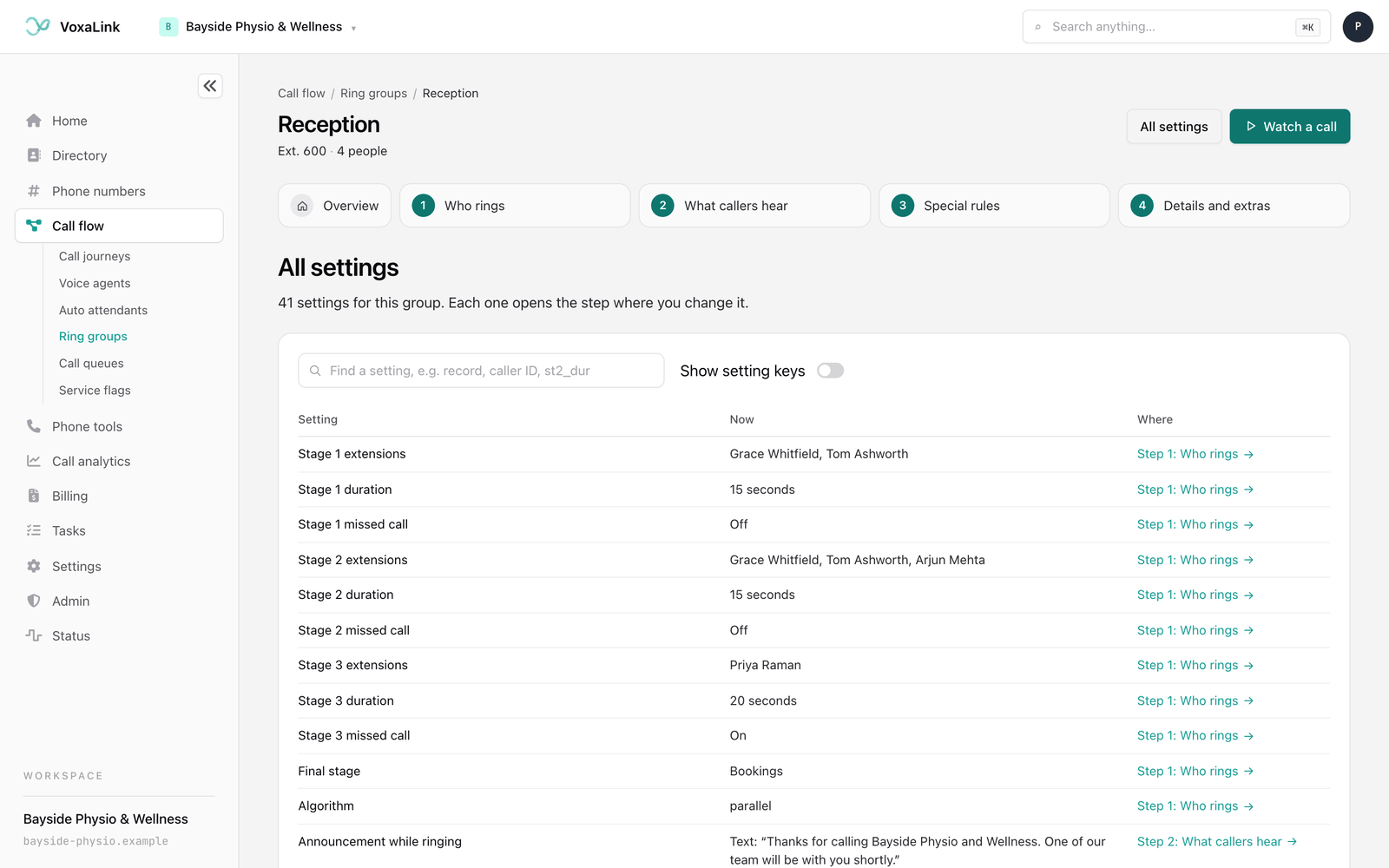
All settings, at the top of the page or the Open all settings button under Prefer the full list? on the overview, lists every setting for the group in one table. Each row shows the setting, what it's set to now, and the step where you change it. Click the step to go there.
Use the search box (it says Find a setting) to filter the list, for example by typing "record" or "caller ID". Turn on Show setting keys to add a column with the phone system's own name for each setting, which support may ask for.
Saving your changes
As soon as you change something, a bar appears at the bottom of the screen showing Unsaved changes. Calls keep using the saved settings until you save.
- Save changes applies your changes. A message confirms how many settings were saved.
- Discard changes puts everything back the way it was when you last saved.
If a setting needs fixing first, the page tells you which one and takes you to it. Nothing is saved until it's fixed. If you try to leave with unsaved changes, the page asks Discard your unsaved changes? Press Keep editing to stay.
Deleting a ring group
Deleting removes the group for good, so it lives at the very bottom of the group's page, out of the way of everyday editing. Look for the box headed Danger zone, with the line Delete this ring group. It appears on the overview, on every step and on All settings.
- Open the group from the list and scroll to the bottom.
- Press Delete ring group. The button is greyed out while a save is in progress.
- A window titled "Delete Reception?" (with your group's name) explains that this removes the ring group from the phone system, and that callers sent to it, or dialling its numbers, will no longer reach it. If you had unsaved changes, it adds that they will be discarded.
- Type the group's account number into the box, exactly as the window shows it. The red Delete ring group button stays off until what you typed matches.
- Press Delete ring group. The button says Deleting… for a moment, then you land back on the Ring groups list. Cancel closes the window without deleting anything.
If the phone system turns the delete down, for example because the group is still in use, the window shows a message and nothing is deleted. Try again in a moment. If the group is deleted but VoxaLink can't finish tidying up its own records, the list shows an amber message naming the group and what to do next. Follow it before you create a group with the same number.
VoxaLink does not update the places that send calls to the group. A phone number, an auto attendant, a call queue or another ring group's rule that points here keeps pointing here, and those callers will no longer reach the group. Before you delete, check where it is used, then point those places somewhere else.
A worked example: Bayside Physio's reception
Bayside Physio & Wellness wants reception calls to ring the front desk first, bring in the admin team if nobody answers, and then send the caller to the Bookings queue so nobody gets voicemail during opening hours. On public holidays, calls should go straight to the after-hours menu.
- Create the group. Press New ring group, choose Team first, then a backup, name it "Reception", give it a free account number and press Create ring group.
- Stage 1 is the front desk. Add the reception extensions and set Duration to 15 seconds.
- Stage 2 is the backup. Add the admin staff, set Duration to 20 seconds and turn on Missed call, so someone hears about calls nobody picked up.
- Choose the final stage. Set Final stage to the Bookings call queue, so callers wait in line rather than ringing out.
- Add a message. In step 2, choose Text, press Use suggested wording, and set Number of rings before announcement to 2.
- Handle public holidays. In step 3, press + When service flag is active, pick "Public holiday" and set the destination to the After-hours menu.
- Show the line on staff phones. In step 4, set From-header to one of the Group name options so the front desk can see the call came through Reception.
- Watch it. Press Watch a call, choose Nobody picks up, and check the call ends at Bookings. Then choose A rule matches to see the holiday rule.
- Save. Press Save changes, then point the reception number at the group from Phone numbers.
Everyday tasks
- How do I ring a team on one number? Press New ring group, add the team to stage 1, and point a number at it. See Creating a ring group.
- How do I bring in more people when nobody answers? Add a second or third stage in Who rings. See Step 1: Who rings.
- How do I make sure unanswered calls go somewhere? Choose a Final stage. The overview shows Every call ends somewhere when it's set.
- How do I check how a call will play out? Press Watch a call. See Watch a call.
- How do I tell group calls apart from direct calls? Set a Ring melody for direct call to extension and a From-header that shows the group name, in step 4.
- How do I send calls elsewhere on holidays or after hours? Add a rule with a service flag in step 3. See Step 3: Special rules.
- How do I find a setting quickly? Open All settings and search for it.
- How do I delete a ring group? Open it and use the Danger zone at the bottom of the page. See Deleting a ring group.
- What if callers should wait in line instead? Use a call queue.