
Call queues
Set up a call queue, choose who answers, what callers hear and what happens when it gets busy, with every choice in each setting explained.
A call queue holds callers in line and hands each one to the next free agent. Use one for a bookings line, a support line or an insurance enquiries line, anywhere callers should wait their turn instead of ringing out. In the examples below, Bayside Physio & Wellness runs a "Bookings" queue on extension 500.
Open it from Call flow, then Call queues.
Agents are people on your team An agent is a person's extension that answers calls for the queue. Agents log in to the queue when they start work and log out when they finish. By default the queue rings only agents who are logged in. Logging out of a queue does not stop someone's own direct calls. It only takes them out of the queue.
How a queue works
- The caller hears the initial greeting, then music while they wait.
- The queue rings agents in stages. Stage one rings the first agent. If nobody answers within the stage time, the next stage adds more agents, and so on until someone picks up. By default a stage lasts 60 seconds and adds one agent.
- If the caller waits too long, or the line is full, the queue sends the call somewhere else you choose, such as a mailbox, a manager's extension or an auto attendant.
While they wait, callers hear a repeating cycle. The initial greeting plays once. After that they hear music, and your other announcements play in turn with a stretch of music between each one.
Set up your first queue
- Open Call flow, then Call queues, and click New call queue.
- Enter an Extension number, 3 to 15 digits. This is the internal number that reaches the queue. The form tells you straight away if the number is already used.
- Enter a Display name, for example "Bookings". It is optional, but a clear name helps in lists and on agents' phones.
- Click Create call queue. The queue's page opens on Setup.
- Open the Who answers card, add your agents under Primary agents, then click Save changes at the bottom of the page.
- Send calls to the queue. Point a public number at it from Phone numbers, or choose it as the destination of an auto attendant option or a call journey.
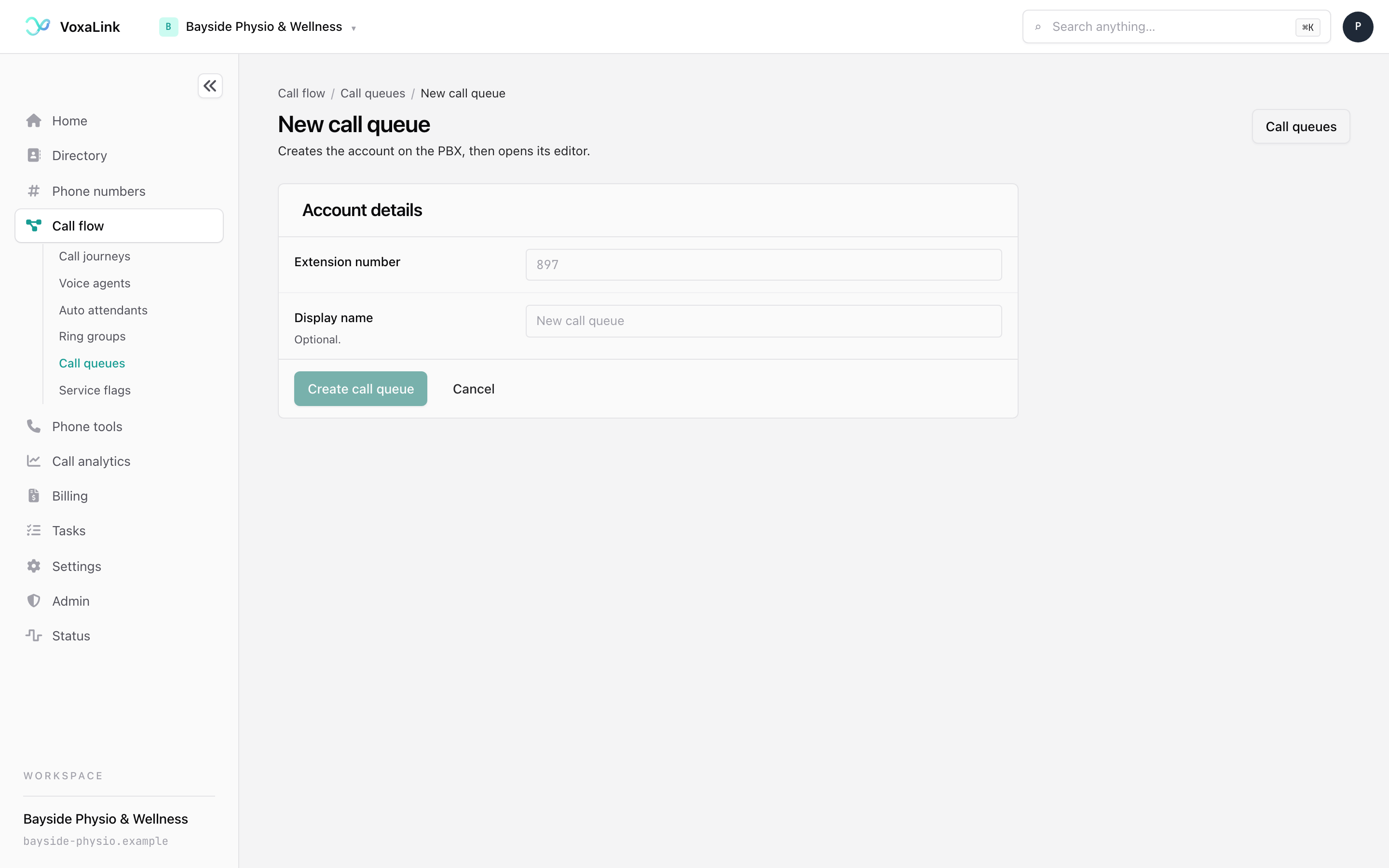
A new queue works with the defaults. Add greetings, backup teams and busy rules later, one card at a time.
The list of call queues
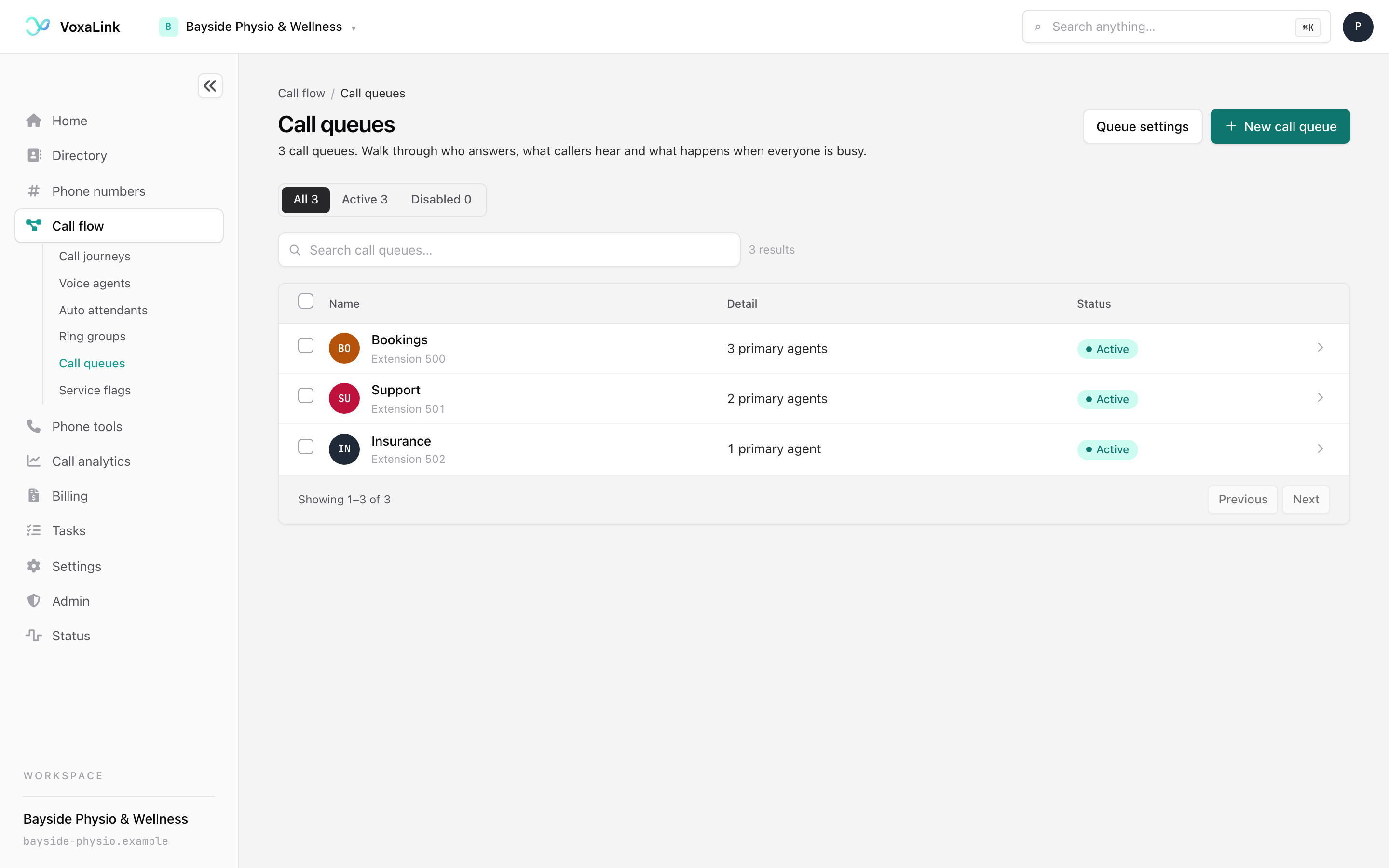
Each row shows the queue's name and extension, how many primary agents it has, and whether it is Active or Disabled. Use the All, Active and Disabled buttons or the search box to find a queue. Click a row to open it.
- The count reads "3 primary agents" and covers primary agents only. Backup teams and people who add themselves are not in it. If the count could not be read, the row says Agents not loaded instead of zero.
- Queue settings at the top right opens the settings shared by every queue. See Queue settings shared by every queue.
- To delete several queues at once, tick them and choose Delete. You are asked to confirm.
The queue's page
A queue's page has four tabs across the top.
| Tab | What it is for |
|---|---|
| Setup | Every setting that decides how the queue behaves. This is where you will spend your time. |
| Activity | Live calls, agent status, performance reports, the call log and recordings. |
| Numbers | The numbers that reach this queue, each with an optional whisper announcement. |
| Webhooks | Messages the queue sends to another system when something happens. |
Queue settings at the top right opens the settings shared by every queue.
Saving your changes
Changes on Setup and Webhooks stay as a draft until you save. The bar at the bottom of the page tracks them.
- With nothing edited it reads "No unsaved changes. Edit anything on this page, then save once."
- After an edit it shows Unsaved changes and how many settings you changed. Click See what changed for the list.
- Save changes applies everything at once. The queue is live, so the next caller gets the new settings.
- Discard changes puts every edited setting back the way it was saved.
A few things save on their own, outside Save changes. Each number on the Numbers tab has its own Save button, and actions on the Activity tab, such as deleting a recording, take effect when you confirm them.
The Setup tab, top to bottom
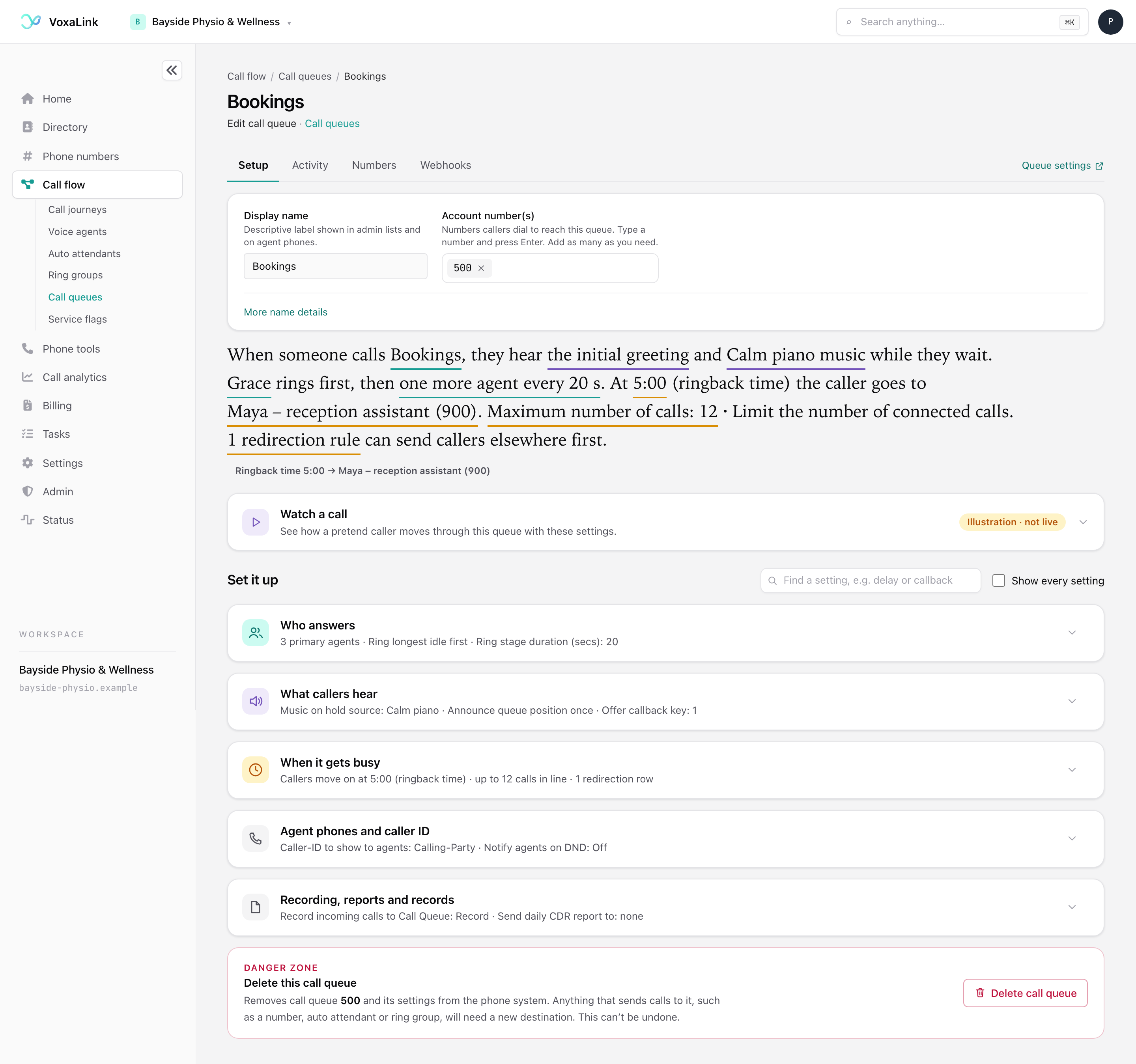
The name card. At the top you will find the queue's identity.
- Display name is the name shown in lists and on agents' phones.
- Account number(s) are the internal numbers that reach the queue. Type a number and press Enter to add it.
- Caller ID is the number shown to the other person when the queue sends a call outside your business.
- Caller ID for text messages is the number text messages come from when agents send them for this queue.
- More name details opens the short name for small phone screens, the pronunciation the voice uses when it says the name, and a note for your own use.
The summary sentence. Under the card, one sentence describes what a caller experiences with your current settings, for example "When someone calls Bookings, they hear the initial greeting and Calm piano music while they wait. Grace rings first, then one more agent every 20 s." The underlined phrases are links. Click one to open the card that controls it. Small notes under the sentence flag problems, such as an empty Primary agents list or a time limit with no destination.
Watch a call. This bar is closed until you click it. It opens an illustration of your settings, explained in the next section.
Set it up. Five cards hold every setting. Click a card's title to open it. While a card is closed, a one-line summary shows its main choices. Two tools sit above the cards.
- Find a setting searches by word. Type "music", "delay" or "callback" and click a result. The page opens the right card and highlights the setting. If a setting only appears once another is set, the page tells you what to set first.
- Show every setting reveals rarely used settings, each with its technical name. A rarely used setting you have already changed is always shown.
The cards are Who answers, What callers hear, When it gets busy, Agent phones and caller ID, and Recording, reports and records. At the very bottom is the Danger zone for deleting the queue.
Watch a call
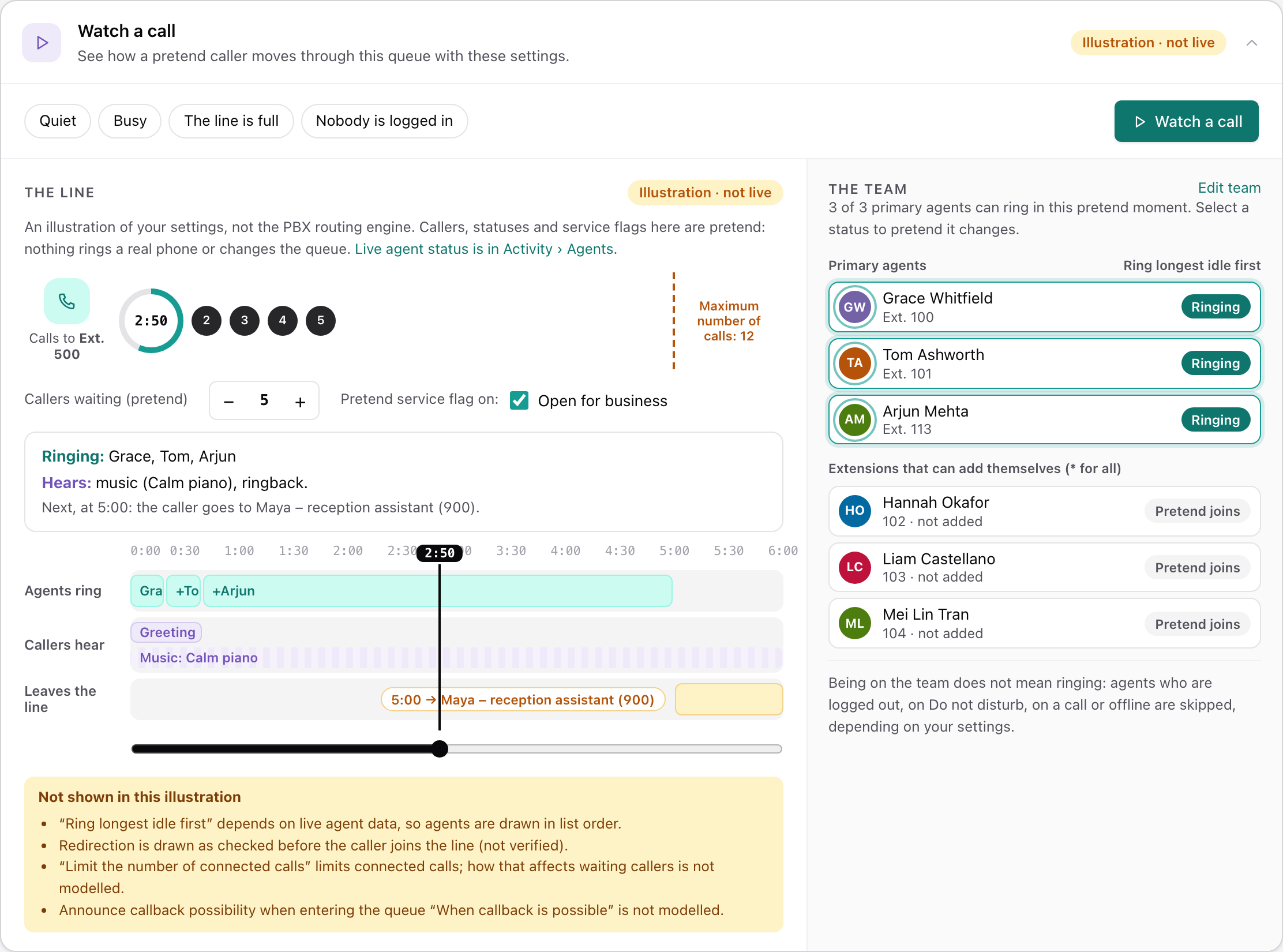
Watch a call is a rehearsal. It is labelled Illustration · not live because nothing in it is real. Nothing rings and nothing changes in the queue. Use it to check that your settings do what you expect before a real caller meets them.
- The buttons Quiet, Busy, The line is full and Nobody is logged in set up a pretend situation.
- Watch a call plays a caller's wait through. Drag the slider to any moment and the panel says who is ringing, what the caller hears and what happens next.
- Callers waiting (pretend) sets how many callers are in line. If your settings use a service flag, tick Pretend service flag on to see what changes.
- On the right, The team lists your agents. Click an agent's status to pretend they are ready, on a call, on do not disturb, logged out or offline, and watch the queue skip them.
The yellow Not shown in this illustration box lists anything it cannot draw, such as "Ring longest idle first", which depends on live data. To see who is really logged in, use Activity, then Agents.
Who answers
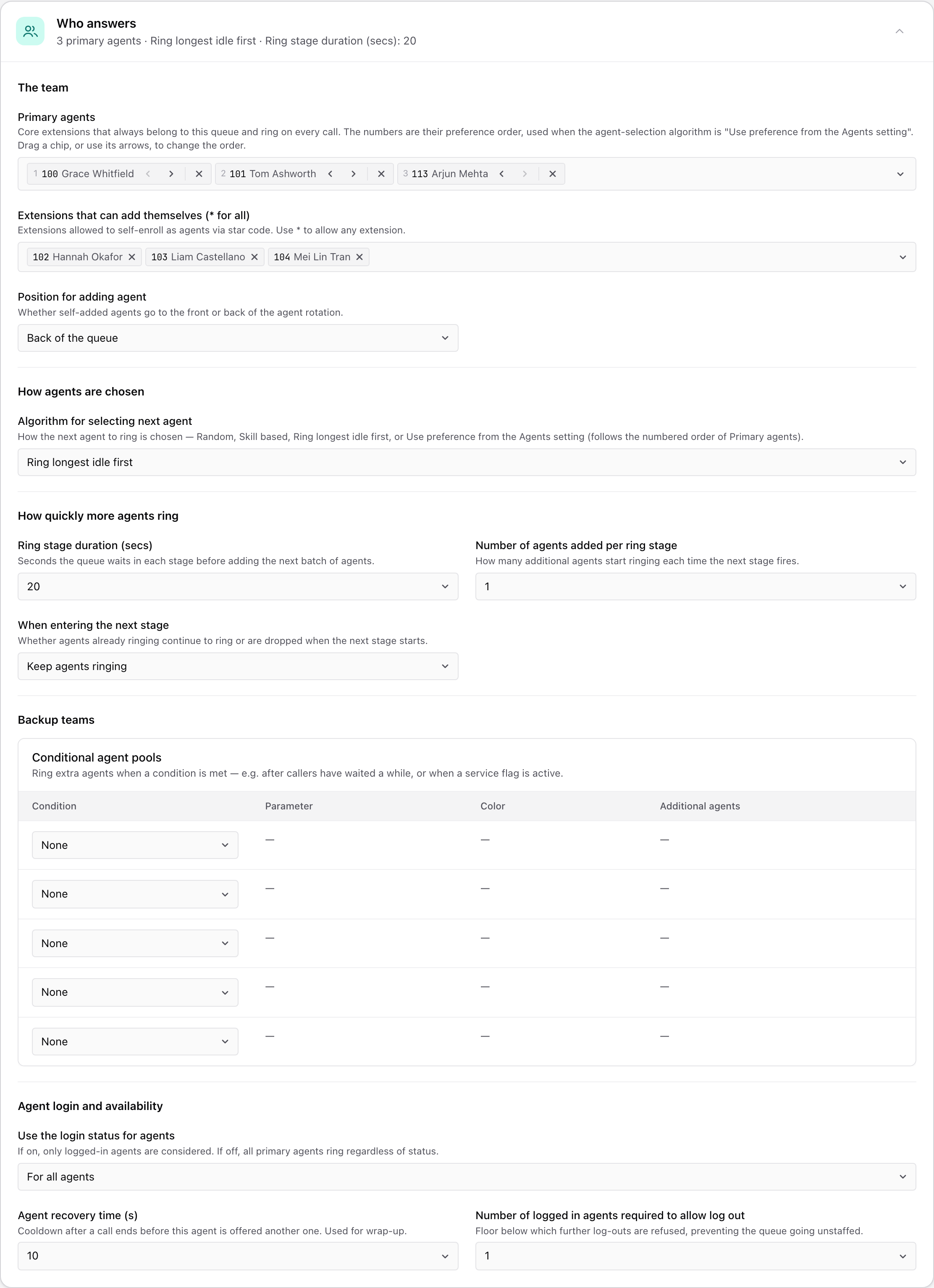
The team
Primary agents are the core group. They are on the queue all the time and ring on every call. Add their extensions here. Each agent appears as a numbered chip. Drag a chip or use its arrows to change the order. The order only matters if you choose "Use preference from the Agents setting" below.
Extensions that can add themselves ( for all)* lists people who may join the queue by logging in to it without being a primary agent. Choose * to let anyone join. Position for adding agent appears once someone is allowed to join.
| Choice | What happens |
|---|---|
| Front of the queue | People who add themselves are rung before the rest. |
| Back of the queue | People who add themselves are rung after the rest. |
How agents are chosen
Algorithm for selecting next agent decides who rings next.
| Choice | What happens | Use it when |
|---|---|---|
| Random | Any available agent, picked at random. | Everyone is equal and you do not care who gets the call. |
| Ring longest idle first | The agent who has been free the longest rings first. | You want calls shared evenly. Most queues use this. |
| Use preference from the Agents setting | Agents ring in the order of your Primary agents chips, first to last. | One person should get calls first, such as a senior agent. |
| Skill based | Matches the call to agents by the skills on their extension. | Different agents handle different topics or languages. Set up skills in Queue settings. |
With Skill based, Add language skill requirement appears. Default uses the business-wide setting from Queue settings, Don't add turns the requirement off, and a percentage sets the minimum language match an agent needs to get the call.
How quickly more agents ring
| Setting | Choices | What it does |
|---|---|---|
| Ring stage duration (secs) | 2 to 300 seconds, such as 20, 30, 60 or 120 | How long each stage lasts before the next one starts. A short stage reaches your whole team sooner. |
| Number of agents added per ring stage | 1 to 20 | How many more agents start ringing at each stage. With a large team keep this at 1 or 2 so a call does not ring everyone at once. |
| When entering the next stage | Keep agents ringing, or Stop ringing agents | Keep means earlier agents carry on ringing alongside the new ones. Stop means only the newest stage rings. |
For example, with 20 seconds, 1 agent and Keep agents ringing, the first agent rings at 0:00, the second joins at 0:20 and the third at 0:40. All three ring until someone answers.
Backup teams
Conditional agent pools bring in extra people only when needed, for example "ring the admin team if a caller has waited more than two minutes". You can have up to five pools, one per row. Each row has four columns.
- Condition is when the pool joins. The table below lists the choices.
- Parameter is the detail the condition needs, such as a number of seconds, a number of calls or which service flag. A column only appears when the row's condition uses it.
- Color can be red, green or yellow. The wallboard, a live screen of queue activity, uses it to mark calls the pool handled.
- Additional agents are the people in the pool.
| Condition | The pool joins when |
|---|---|
| None | The row is unused. |
| When service flag is active | The service flag you pick is ON. Use it for busy periods you can schedule. |
| When service flag is not active | The service flag you pick is OFF. |
| Waited longer than… | The caller has waited longer than the time you enter. |
| Number of waiting calls exceeds… | More callers are waiting than the number you enter. |
| No agents available | No agent can take the call right now. |
| No primary agents available | No primary agent can take the call right now. Self-added agents do not count. |
| No agents registered | No agent has a phone signed in. |
| No primary agents registered | No primary agent has a phone signed in. |
| After hearing ringback for (s) … | The caller has heard an agent's phone ring for the time you enter. |
| After talking for … | The call has been in the talking state for the time you enter. Rarely needed. |
| After holding for … | The call has been on hold for the time you enter. Rarely needed. |
Agent login and availability
| Setting | Choices | What it does |
|---|---|---|
| Use the login status for agents | For all agents | Only logged-in agents ring. This is the default. |
| Only for primary agents | The login rule applies to primary agents only. | |
| Ignore login status for all agents | Everyone on the lists rings, logged in or not. | |
| Agent recovery time (s) | None, or 1 to 300 seconds | A pause after each call before that agent is offered another, so they can finish notes. |
Under Show every setting you will also find these.
| Setting | Choices | What it does |
|---|---|---|
| Automatic log out for agents | None, or a trigger such as "When agent is on DND during a call attempt", "When agent has no device available during a call attempt", "When a device of the agent returns a busy code", "When a device of the agent returns a error code or timeout", "When a device of the agent is not registered for one minute", or "All of the above" | Logs an agent out of the queue automatically when the condition you pick happens. |
| Number of logged in agents required to allow log out | 0 to 10 | Stops the last agents leaving the queue empty. |
| Duration for flagging missed calls for agents | A time | A call that rings an agent for less than this is not counted as missed. |
| Automatically log agent out after missing calls | Never, After 1 missed call, After 2 missed calls, After 3 missed calls | Logs an agent out after that many missed calls in a row. |
| Log agents out at midnight | Default, Yes, No | Yes gives everyone a fresh login each morning. Default follows the business-wide setting. |
What callers hear
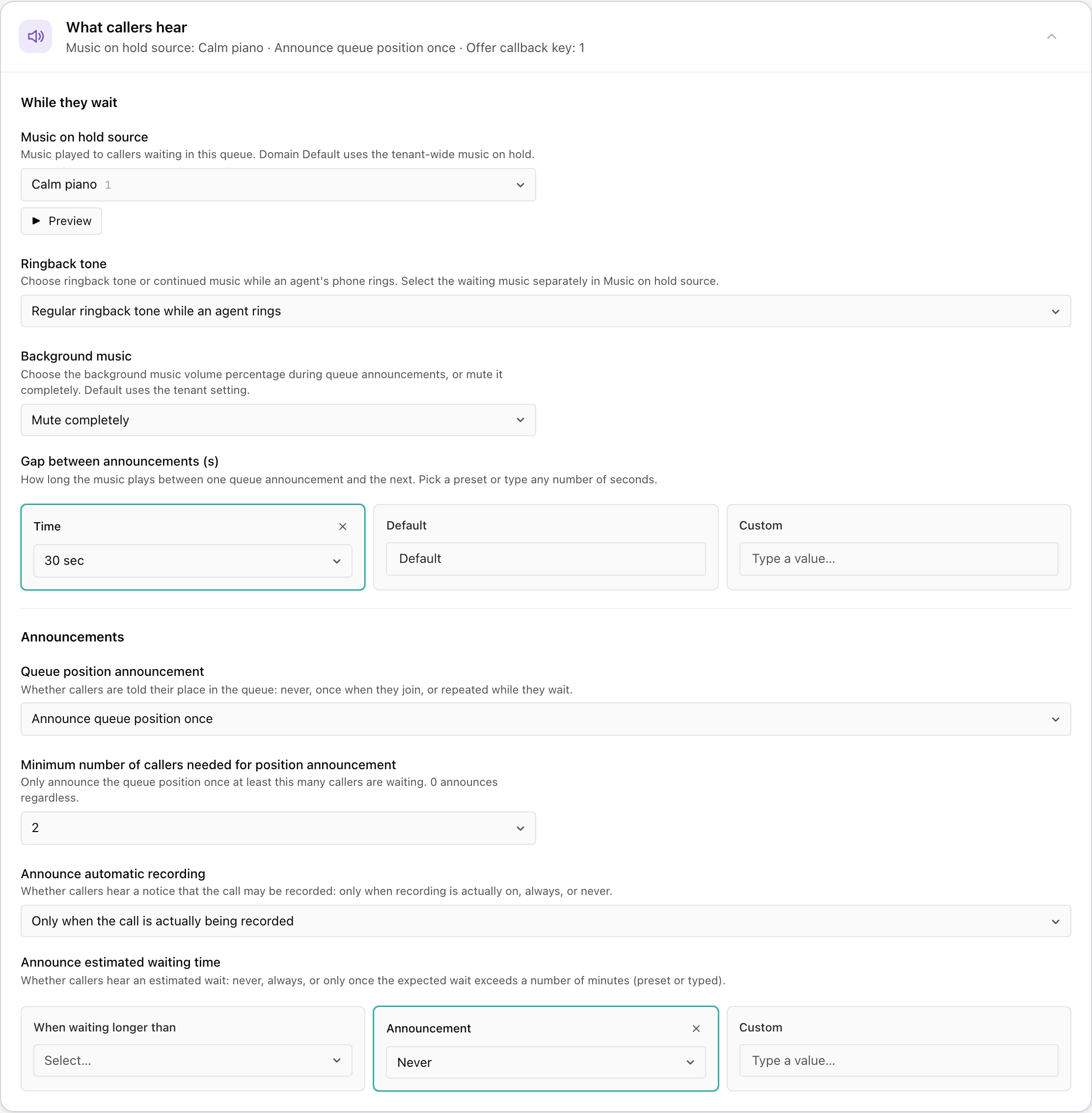
While they wait
| Setting | Choices | What it does |
|---|---|---|
| Music on hold source | Domain Default, or one of your uploaded music files | Domain Default uses your business-wide music. Pick a file for music just for this queue. Preview plays it. |
| Ringback tone | Regular ringback tone while an agent rings | The caller hears a normal ringing sound while an agent's phone rings. |
| No ringback tone, keep playing music | The music carries on while an agent's phone rings. | |
| Background music | Mute completely, Mute to 10 %, Mute to 20 %, Mute to 50 %, Don't mute | How loud the music stays while an announcement plays. Mute completely makes the announcement easiest to hear. |
| Gap between announcements (s) | Time (5 seconds to 3 minutes), Default, or Custom | How long the music plays between one announcement and the next. Default uses the standard gap. Only one of the three boxes is used. |
Announcements
| Setting | Choices | What it does |
|---|---|---|
| Queue position announcement | No announcement | Callers are not told where they are in line. |
| Announce queue position once | Callers hear their place once, when they join. | |
| Announce position periodically | Callers hear their place again as it changes while they wait. | |
| Minimum number of callers needed for position announcement | 0 (always announce), 1, 2, 5, 10 | Keeps the announcement quiet when the line is short. |
| Announce automatic recording | Only when the call is actually being recorded | The "this call may be recorded" notice plays only for recorded calls. |
| Always | The notice plays on every call. | |
| Never | The notice never plays. | |
| Announce estimated waiting time | Never | No wait estimate. |
| Always | Callers always hear an estimate. | |
| When waiting longer than, 1 to 120 minutes, or Custom | Callers hear an estimate only when the expected wait is longer than your number of minutes. |
Messages
The messages table holds the announcements waiting callers hear. Initial greeting plays once as a caller joins. Open Additional announcements (9) for nine more messages that play in turn while the caller waits.
For each message you choose how to provide it.
- Text speaks the words you type in the system's voice.
- File plays a recording you upload. A label shows where it stands, such as Recording saved, Not saved yet, Removed when you save or No recording.
- Generate with AI makes a natural-sounding recording from your words, using the voice set under Settings. Type your words under What should the voice say?, press Generate voice, listen, then press Use this recording.
- Play lets you listen to a saved message. The bin button marks a saved recording for removal when you save. Press it again to keep it.
- Excluded time skips the message while a service flag is ON. Use it for a holiday notice you only want on public holidays. Leave it on No specific time excluded to always play the message.
New uploads and changes apply when you click Save changes.
Callback
Instead of holding, callers can ask to be called back.
| Setting | Choices | What it does |
|---|---|---|
| Offer callback key | Never, or a key from 0 to 9, * or # | The key a caller presses to ask for a callback. Never switches callbacks off. |
| Callback method | Virtual hold | Keeps the caller's place in line and calls them back when their turn comes. |
| Add message to mailbox | Records a callback request in the mailbox you choose. | |
| Add to call list | Adds the caller to the queue's outbound call list for an agent to ring later. | |
| Announce callback possibility when entering the queue | When callback is possible | The offer is announced straight away. |
| By Wait Time | The offer is announced only after the caller has waited the number of minutes you pick. | |
| By Queue Length | The offer is announced only once the number of calls you pick are waiting. | |
| Never | The offer is not announced. | |
| Time for offering callback | Always, or a service flag | Limits callbacks to when the flag is ON, for example only during peak hours. |
| Add missed calls to the outbound call list | Never | Missed calls are not saved. |
| Add calls that were ringing an agent | Calls that rang an agent but were not answered are added. | |
| Add abandoned calls to the outbound call list | Callers who hung up while waiting are added. | |
| Add all calls that did not connect | Every call that never reached an agent is added. | |
| Dial plan for outbound calls | Domain Default, or another dial plan | The dialling rules used to place callbacks. See Dial plans. |
Let callers press a key
Keypad actions maps the keys 0 to 9, and a fax tone, to an action. Leave a destination empty to leave that key unused. The queue does not announce the keys itself, so mention them in your messages, for example "Press 1 to leave a voicemail".
| Action | What happens when the caller presses the key |
|---|---|
| Redirect to number | The caller is sent to the extension, queue or number you choose. |
| Send text message to caller | The caller gets a text message with the words you enter. |
| Trigger HTTP GET to URL | The queue sends a request to a web address you enter, for connecting other software. |
Rate the call
Caller survey method decides what happens after the agent hangs up.
| Choice | What happens |
|---|---|
| None | No survey. |
| Ask for 1-5 star rating | The caller stays on the line and rates the call from 1 to 5. The rating is stored with the call. Ratings that redirect to a manager (None, or 1 star up to 1 to 5 stars) sends unhappy callers to someone who can follow up. |
| Redirect to survey number | The caller is sent to a survey number you enter in Redirection number. |
Outbound calling
This block is rarely used, so it appears with Show every setting. A queue can also make calls. Switch Enable outbound calling to On and the queue dials the numbers on its outbound list and connects answered calls to agents. The settings under it control how many agents must be free before dialling starts, how many times a number is retried, how many callers may already be waiting, how long to ring, an optional key the person must press to be connected, and the gap between attempts. The list itself is under Activity, then Outbound calling.
When it gets busy
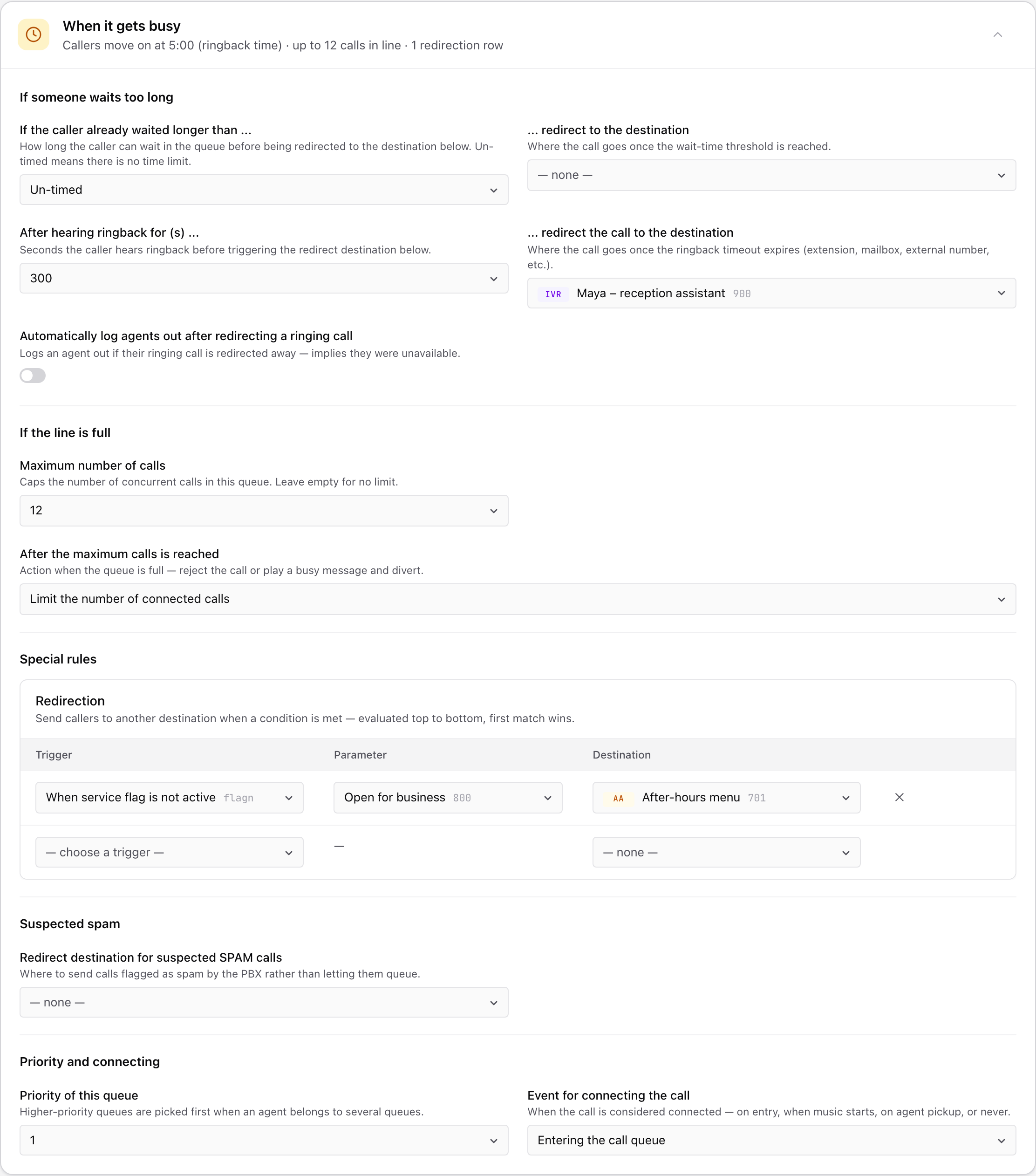
If someone waits too long
| Setting | Choices | What it does |
|---|---|---|
| If the caller already waited longer than ... | Un-timed, or a time from 1 second up | The longest a caller can wait in the queue in total. Un-timed means no limit. |
| ... redirect to the destination | An extension, mailbox, auto attendant, ring group, queue or number | Where the caller goes when that limit is reached. |
| After hearing ringback for (s) ... | Un-timed, or 5 to 300 seconds | How long a caller may listen to an agent's phone ringing with no answer. This counts the ringing time only, not the whole wait. |
| ... redirect the call to the destination | An extension, mailbox, auto attendant, ring group, queue or number | Where the caller goes when the ringback limit is reached. |
| Automatically log agents out after redirecting a ringing call | On or Off | When on, an agent whose ringing call was taken away is logged out, on the assumption they were not there. |
If you set a limit but no destination, the notes under the summary sentence point it out.
If the line is full
Maximum number of calls caps how many calls the queue handles at once. The default is no limit. Once you set a number, After the maximum calls is reached appears.
| Choice | What happens to the next caller |
|---|---|
| Limit the number of connected calls | Nobody is turned away. The number of calls connected to agents at once is capped. |
| Reject with busy | The caller hears a busy signal. |
| Reject with audio message | The caller hears a message, then the call ends. |
| Redirect call | The caller is sent to the Diversion destination you pick, for example a voicemail box. |
Special rules
The Redirection table sends callers somewhere else before they join the line when a condition is true. The usual use is after hours, for example "when the Open for business flag is not active, send calls to the After-hours menu". Each row has a Trigger, a Parameter where the trigger needs one, and a Destination. Rows are checked from top to bottom and the first match wins. To add a rule, fill in the empty row at the bottom.
| Trigger | The rule applies when |
|---|---|
| When service flag is active | The service flag you pick is ON. |
| When service flag is not active | The service flag you pick is OFF. Use it for after-hours rules. |
| Always | Every call. Put it last, because nothing below it will ever be reached. |
| All primary agents are logged out | No primary agent is logged in. |
| All agents logged out | No agent at all is logged in. |
| No agent has phone registered | No agent has a phone signed in. |
| All agents busy | Every agent is on a call. |
| Use call forward all from extension | The extension you pick has forwarded all its calls, and callers follow that forward. |
| When call is already ringing but all agents have become unavailable | A call is ringing agents and every agent becomes unavailable before anyone answers. |
| Caller in address book | The caller's number is in your address book. |
| Internal Call | The call comes from inside your business. |
| External Call | The call comes from outside your business. |
See Service flags for how a flag turns ON and OFF.
Suspected spam. Redirect destination for suspected SPAM calls sends likely spam somewhere other than your agents. Once it is set, Threshold value for rejecting SPAM calls decides how strict to be, where a higher number lets more calls through. SPAM score for anonymous callers adds to a call's score when the caller hides their number.
Priority and connecting
| Setting | Choices | What it does |
|---|---|---|
| Priority of this queue | 1 to 9 | When an agent belongs to several queues, calls from the higher-priority queue are offered first. |
| Event for connecting the call | Entering the call queue | The call counts as connected the moment it enters the queue. Most queues use this. |
| Music playback | The call counts as connected when the music starts. | |
| Agent picks up call | The call counts as connected only when an agent answers. | |
| Never connect | The call is never marked as connected by the queue. |
Agent phones and caller ID
This card holds what agents see and hear.
| Setting | Choices | What it does |
|---|---|---|
| Caller-ID to show to agents | Calling-Party | The caller's own name and number. This is the default. |
| Group name | The queue's name, so agents know which line is ringing. | |
| Group name (Calling party) and Group name (Calling number) | The queue's name together with the caller's name or number. | |
| Original caller-ID | The caller ID exactly as it arrived. | |
| Anonymous | Hides the caller's details from agents. | |
| Position, Calling party name (CMC), Calling party number (CMC), From (To), From (Trunk), Trunk (From) | Special layouts that mix the caller's details with the place in line, the dialled number or the line the call arrived on. Most queues never need them. | |
| Ring melody for agents | None, or a built-in ringtone | A different ringtone so agents can tell queue calls from their own calls. |
| Notify agents on DND | Off | Agents on do not disturb get nothing. |
| Primary agents | Primary agents on do not disturb still get a short notice of queue calls. | |
| All agents for this queue | Every agent on do not disturb gets the notice. | |
| Call routing based on | Queue entry time | Callers are served in the order they joined. |
| Try to pull out callers when their last agent becomes available | A returning caller is sent back to the agent they spoke to last. |
Under Show every setting you will also find settings for changing caller ID when redirecting, paging incoming calls over a paging group, call pickup from a phone button, and how calls behave on agent phones. These include ringing agents who are already on a call, ringing several calls at once, letting agents divert calls, what happens when an agent rejects a call, and turning off mobile forking. Most queues leave all of them alone.
Recording, reports and records
| Setting | Choices | What it does |
|---|---|---|
| Record incoming calls to Call Queue | Default | Follows your business-wide recording setting. |
| Record | Stores the audio of calls into this queue. | |
| Transcribe | Stores a text transcript with no audio. | |
| Both | Turn on Record and Transcribe together to store audio and a transcript. | |
| Send daily CDR report to | One or more email addresses | A daily email listing the queue's calls. CDR means call detail record, the log entry kept for every call. |
| Send daily CDR report at | A time, in 15-minute steps, plus which days | When the report is sent. |
| Send nightly CDRs as | Default, Send charts, Embedded HTML, HTML attachment, Text attachment | How the report email looks. |
| Send IM to these extensions | Extensions | Who gets short notices about queue activity. |
| Default category | None, or one of your categories | The wrap-up code applied when the agent does not pick one. |
| Ask for category after call | Never | Agents are not asked. |
| Always | Agents are asked after every call. | |
| When call has no category | Agents are asked only when no category has been set. |
See Categories for how to build the list. See Call analytics for reports across queues.
Under Show every setting you will also find Add to the address book and keep it for ... (Off, or 1 day up to 12 months), Automatically add CMC (Off, or a random or ascending code of 4 to 9 digits), CRM account and Allow agent connect webhook.
Activity
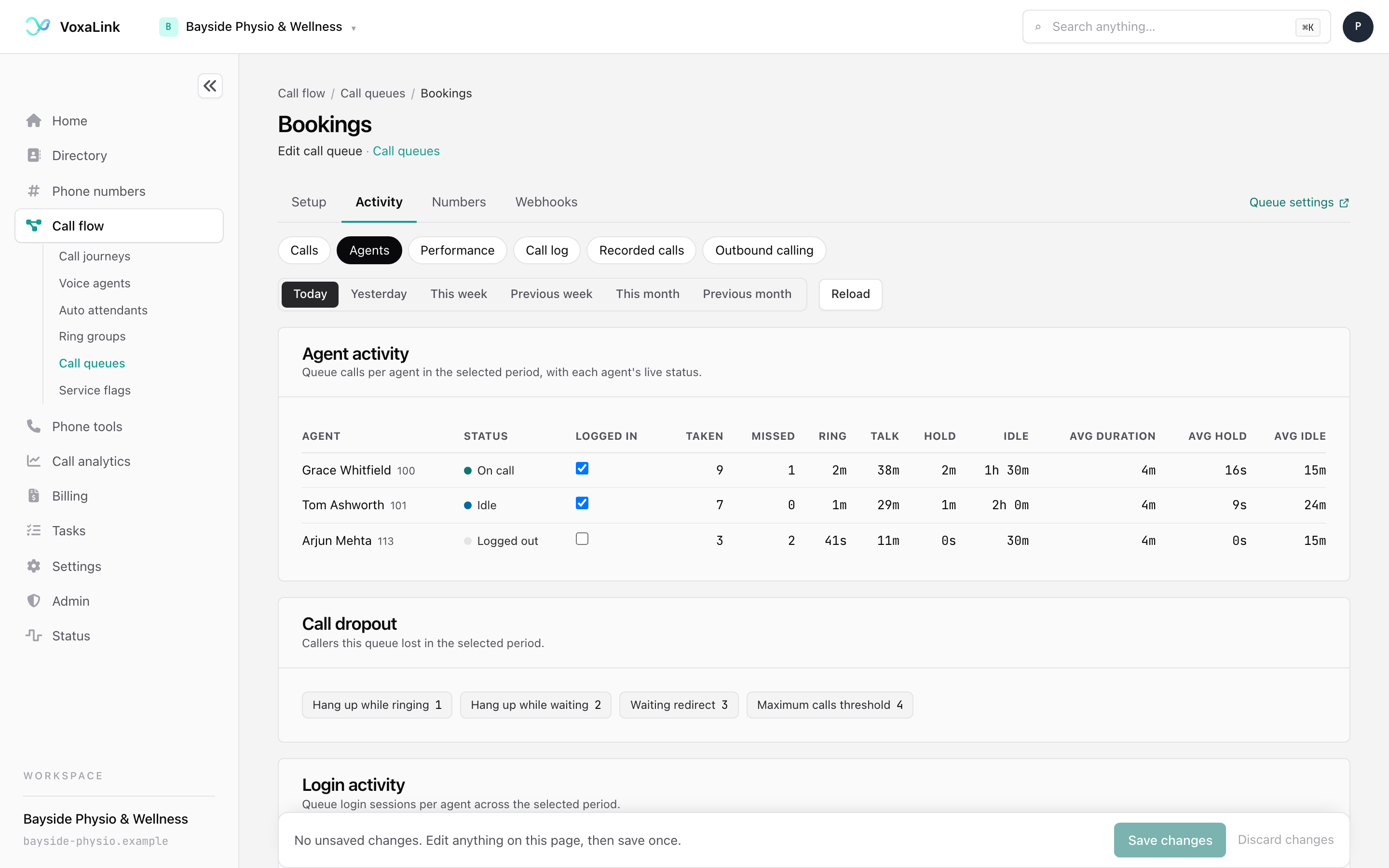
The Activity tab shows what is happening in the queue and what has happened. Pick a view from the buttons along the top.
| View | What it shows |
|---|---|
| Calls | Calls in the queue right now, waiting, ringing an agent or connected. It refreshes every few seconds. |
| Agents | Each agent's live status and their queue calls over the period you pick (Today, Yesterday, This week, Previous week, This month, Previous month), with Call dropout counts and Login activity underneath. |
| Performance | History built from call records for a date range you choose. It shows calls offered and answered, the answer rate, average speed to answer, a service level against 20, 30 or 60 seconds, abandoned calls and missed offers. |
| Call log | Calls this queue handled, with filters by date, caller, destination or agent, and a CSV download. |
| Recorded calls | Recordings for this queue. Play them, add notes, delete them, or check who has played a recording. |
| Outbound calling | The list of numbers the queue dials when outbound calling is on, with an Enabled or Disabled switch and Add numbers. |
A queue with no agents yet says so in Agents and Performance. Add people under Primary agents in Who answers, then come back.
Agents logging in and out
Open Activity, then Agents. Each agent has a status, such as On call, Idle or Logged out, and a Logged in tick box. Tick the box to log someone in, or clear it to log them out. This is handy when someone forgets to log out at the end of the day. Whether the queue pays attention to login at all depends on Use the login status for agents under Who answers.
Logging out only takes the agent out of the queue. Their direct calls still ring. To stop every call, they use do not disturb.
Numbers
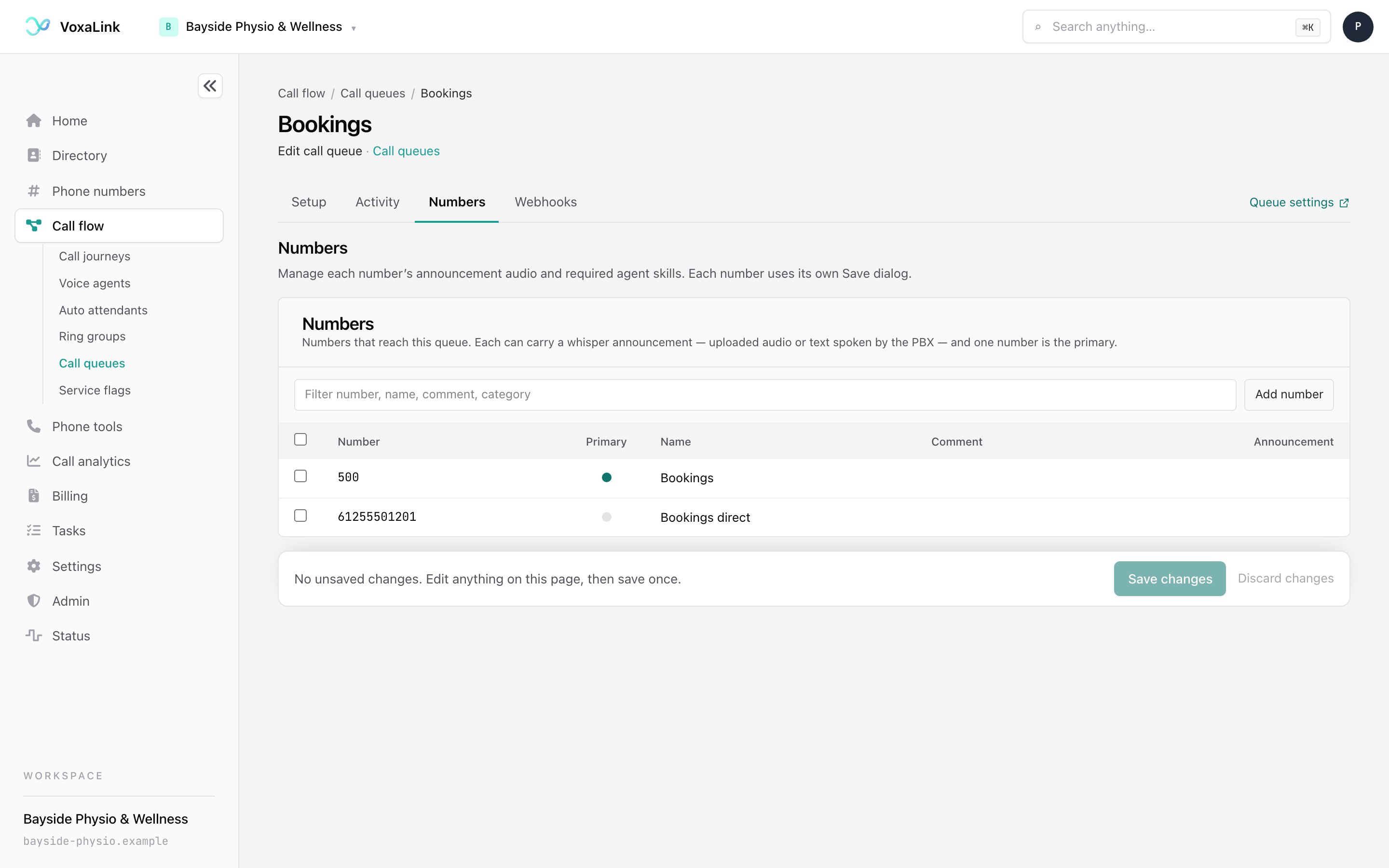
The Numbers tab lists the numbers that reach this queue. One is marked as the primary. Each number can carry a whisper announcement, a short message tied to that number, as typed text or an uploaded recording.
- Add number opens a dialog with Number, Name, Comment, Category and Announcement. If your business uses agent skills you can also set Required skills.
- Tick one number to edit it or make it primary. Tick one or more to delete them.
Each dialog has its own Save button. Its changes apply straight away, separate from Save changes.
Webhooks
A webhook sends a short message to another system's web address when something happens, for example to log calls in your own software. The Webhooks tab lists the events you can use. The ones most queues want are When a new call comes in, When a call is answered and When a call ends (CDR). Open an event, switch it ON and enter the address. Webhooks save with Save changes, like the rest of the queue's settings.
Queue settings shared by every queue
Click Queue settings on the list or at the top right of any queue. These settings apply to every queue in your business.
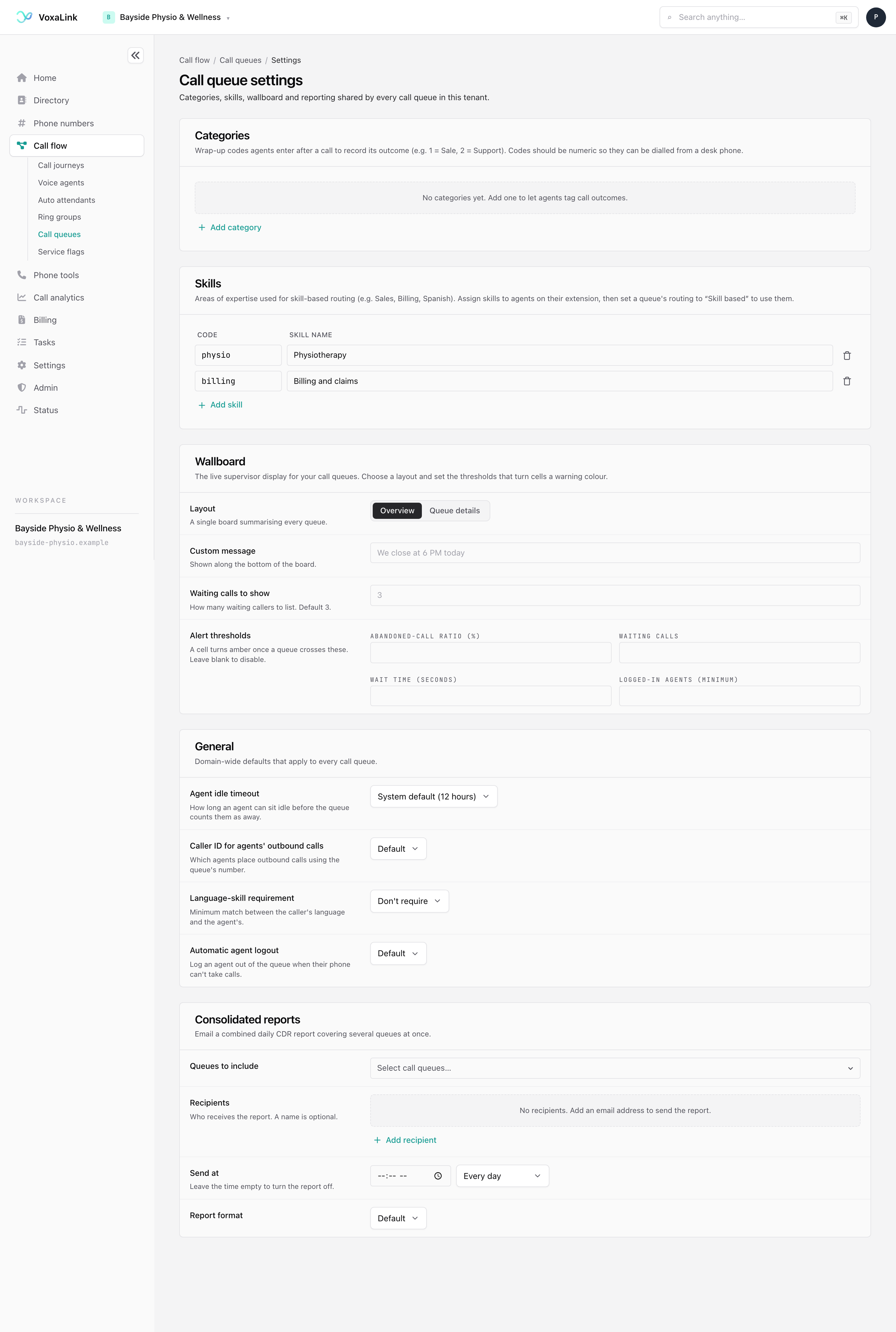
| Section | What it holds |
|---|---|
| Categories | The wrap-up codes agents enter after a call. Click Add category and fill in a Code and its Meaning. |
| Skills | Areas of expertise for the Skill based rule. Click Add skill and enter a code and a name. Assign skills to agents on their extension in Directory. |
| Wallboard | The live supervisor screen. Choose a Layout, either Overview (one board summarising every queue) or Queue details. Add a Custom message for the bottom of the board and set Waiting calls to show, which defaults to 3. Alert thresholds turn a cell amber when a queue crosses a limit for abandoned-call ratio, waiting calls, wait time or minimum logged-in agents. Leave a threshold blank to switch it off. |
| General | Business-wide defaults. Agent idle timeout is how long an agent can sit idle before the queue counts them as away, with a system default of 12 hours. Caller ID for agents' outbound calls, Language-skill requirement and Automatic agent logout each default to the system setting, which queues inherit unless they set their own. |
| Consolidated reports | One combined daily report for several queues. Choose the Queues to include, add Recipients, set Send at and pick a Report format. Leave the time empty to switch the report off. |
Categories
Categories help you see what calls are about. Agents tag each call with a short code, such as "1" for a new booking, and you can look back at calls by category later.
- In Queue settings, under Categories, click Add category.
- Enter a Code and its Meaning, for example 1 and "New booking". Keep codes numeric if agents will enter them on a desk phone.
- On each queue, open Recording, reports and records. Under After the call, set Default category and Ask for category after call.
The queue's Activity views do not break calls down by category, so there is no category report on this page.
Deleting a queue
To delete one queue, open it on Setup and scroll to the bottom. The Danger zone is the last box before the save bar. It appears on Setup only.
- Click Delete call queue.
- In the window that opens, type the queue's number exactly as shown. The red Delete call queue button stays off until it matches.
- Click Delete call queue. You land back on the list.
Deleting removes the queue and its settings. Anything that sends calls to it, such as a number, auto attendant or ring group, needs a new destination. This cannot be undone. To delete several queues at once, tick them on the list and choose Delete.
A worked example, the Bookings line
Bayside Physio & Wellness wants booking calls answered by reception, the admin team as backup on busy mornings, and nothing lost after hours.
- Create the queue. Click New call queue, enter extension 500 and the name "Bookings", and click Create call queue.
- Add reception. Open Who answers. Add the two reception extensions under Primary agents. Set Algorithm for selecting next agent to Ring longest idle first so both share the calls.
- Bring in admin when it is busy. Under Backup teams, set row 1 to Waited longer than… with 2 minutes, add the admin staff under Additional agents, and pick a Color.
- Set the greeting. Open What callers hear. In the messages table, type an Initial greeting such as "Thanks for calling Bayside Physio. A member of our team will be with you shortly." Set Queue position announcement to Announce position periodically.
- Offer a callback. Set Offer callback key to 1 and Callback method to Virtual hold.
- Cap the wait. Open When it gets busy. Set If the caller already waited longer than ... to 10 minutes and choose a mailbox the reception team checks as the destination.
- Handle after hours. Under Special rules, add a row with When service flag is not active, choose the "Open for business" flag and set the destination to the "After-hours menu" auto attendant.
- Check it. Open Watch a call. Choose Busy, tick Open for business under Pretend service flag on and press Watch a call. You should see reception ring first, the admin team join at 2:00 and the caller move on at 10:00. Clear the flag and the after-hours rule sends the caller to the After-hours menu instead.
- Click Save changes, then make a test call during opening hours.
When something is not working
| What you see | Check this |
|---|---|
| The queue rings nobody | Open Activity, then Agents. If every agent shows Logged out, tick Logged in for them, or change Use the login status for agents. Then check that Primary agents is not empty. |
| Calls skip the queue entirely | Look at the Redirection table. A row with the Always trigger, or a flag rule that matches, sends callers away first. The first matching row wins. |
| Callers hear silence | Check Music on hold source. Then check that Background music is not set to mute and that Ringback tone is not set to keep playing music when you expect ringing. |
| Callers are sent away too soon | Compare If the caller already waited longer than ... and After hearing ringback for (s) .... The second one fires after the agent's phone has rung that long, which can be sooner than you expect. |
| A setting is missing | Type its name into Find a setting, or tick Show every setting. Some settings, such as Callback method, appear only after you set the one that controls them. |
| The summary sentence has a warning | Click the highlighted phrase. It opens the card that needs a destination or an agent. |
Still stuck? Open a ticket from the link below this page.